Rule Chains Overview
The Rule Chains Engine is SignalSync's low-code integration and automation layer that enables Tenant Administrators and process designers to define business logic, connect external systems, and automate complex data flows — all through configuration empowered by FreeMarker's templating engine.
Rule Chains can be triggered directly from GWE workflow events or exposed as external REST endpoints, making them a powerful bridge between SignalSync processes and third-party applications.
Rule Chains allow business analysts to configure integrations and automation logic using a visual, node-based approach — eliminating the need for custom development in most integration scenarios.
Core Concepts
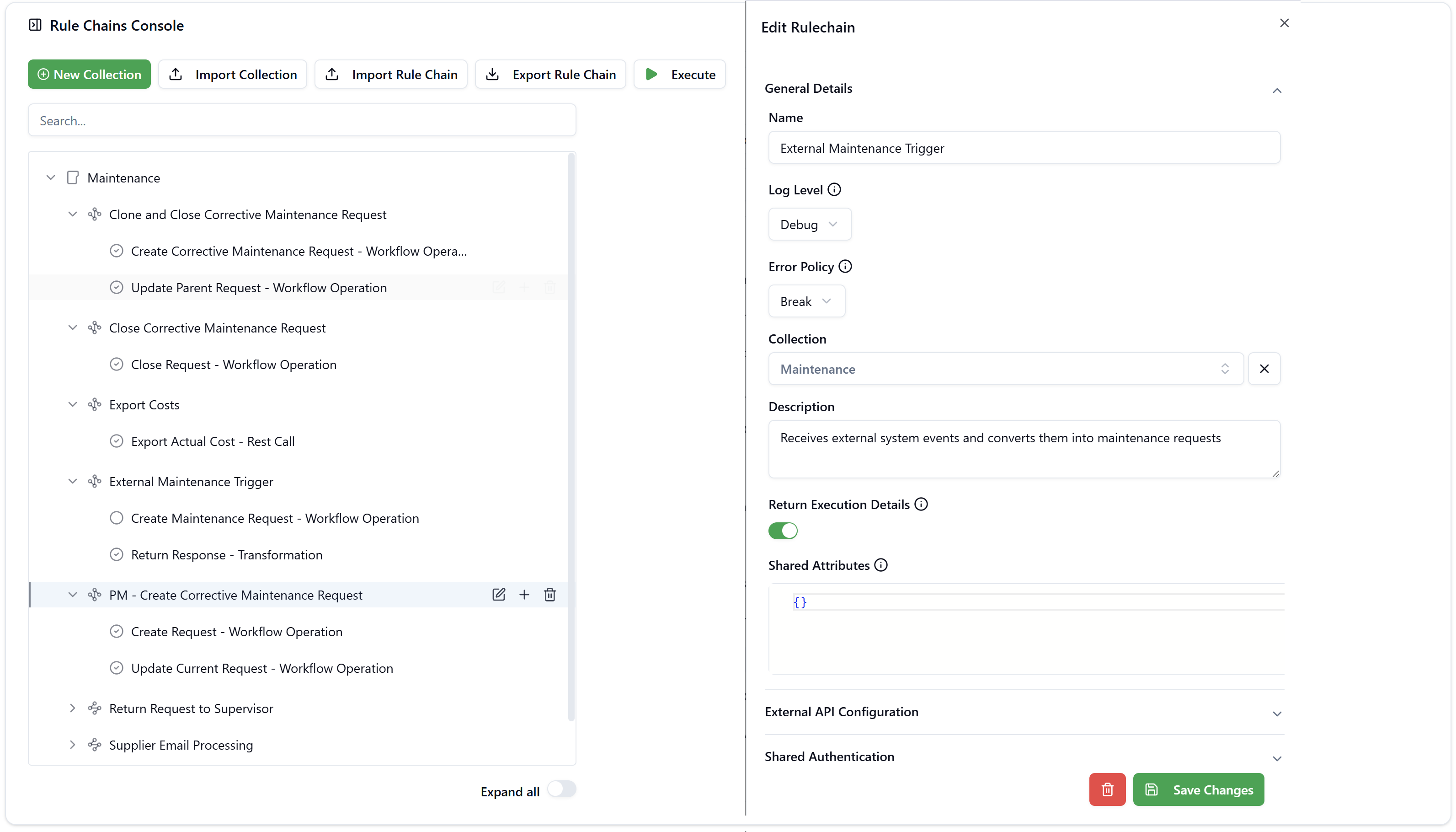
Rule Chains are organized in a three-level hierarchy:
Click to view Rule Chains interface
Collections
A Collection is the top-level container that groups related Rule Chains. Collections are typically used to organize integrations by application domain or use case — for example, a Maintenance collection that contains all rules related to corrective and preventive maintenance workflows.
A collection may include any number of subcollections and each subcollection may in turn have its own subcollections.
e.g.
Maintenance
├── Corrective
│   └── Electrical
│   └── Mechanical
└── Preventive
Rule Chains
A Rule Chain is a sequence of processing nodes that defines the logic for a specific integration or automation scenario.
Each Rule Chain belongs to one Collection and can contain one or more nodes executed in order.
| Node Type | Description |
|---|---|
| Workflow Operation | Triggers a GWE workflow action (create, update, or transition a request) |
| REST Call | Calls an external REST API endpoint with configurable headers, body, and authentication |
| Entity Operation | Performs CRUD operations (Create, Read, Update, Delete) directly on SignalSync entities |
| Continue Condition | Evaluates a FreeMarker expression to conditionally stop or continue the Rule Chain execution |
| Transformation | Transforms data using FreeMarker expressions — used to shape responses, validate form input, or map fields between systems |
Each node can be individually enabled or disabled via the Active toggle, allowing you to test or temporarily bypass specific steps without deleting them.
Node Types in Detail
Workflow Operation
Triggers an action on a GWE workflow — such as creating a new request, updating an existing one, or transitioning it to a new status. This is the primary node type for automating actions within SignalSync processes. The node references the target workflow and the operation to execute, passing data from the current execution context.
REST Call
Sends an HTTP request to an external endpoint. Supports configurable method, URL, headers, and body — making it suitable for pushing data to ERP systems, third-party APIs, or any REST-compatible service. The response is available to subsequent nodes in the chain.
Entity Operation
Performs direct database operations on SignalSync entities without going through a workflow. Supports all four CRUD operations:
- Create — inserts a new entity record with the fields defined in the node body
- Read — retrieves records matching a filter, with support for field selection, sorting, pagination (
limit/offset), and nested entity traversal - Update — modifies records matching a filter; only specified fields are changed
- Delete — removes records matching a filter permanently
Filters support rich operators including eq, ne, in, notIn, contains, gt, lt, gte, lte, isNull, and isNotNull. FreeMarker expressions can be used in filter values and body fields to dynamically reference the current data model.
Before running an Update or Delete node in production, use a Read node with the same filter to verify you are targeting the correct records.
Continue Condition
Controls the execution flow of a Rule Chain. The node body contains a FreeMarker expression that evaluates to a truthy or falsy value. If the condition resolves to false (or equivalent), the Rule Chain stops immediately and no further nodes are executed.
Supported truthy values: true, 1, on, yes
Supported falsy values: false, 0, off, no
Example — stop if a supplier is not set on the request:
${(details.supplier)???c}
Example — continue only if the user is a Tenant Administrator:
${(user.role == "TENANT_ADMIN")?c}
Continue Condition nodes are especially useful for guarding downstream operations — for instance, preventing a cost export from running if required data fields are missing.
?c operatorIt's specific to FreeMarker and makes variables "computer readable". e.g. If a variable contains the value 1000, by default, FreeMarker would attempt to write it as 1,000 to make it human readable.
For integration purposes, when computers need to talk to each other, the decimal separator must be omitted.
When applied to variables that contain text instead of numbers, the ?c operator will surround the value in double quotes.
When applied to variabels that contain boolean values (true or false), the ?c operator will turn the value into string without quotes.
Transformation
Applies FreeMarker template logic to reshape or validate data. The node body is a FreeMarker template that can reference any field from the current data model or from the output of previous nodes.
Common uses include:
- Response shaping — when a Rule Chain is exposed as an external endpoint, define a custom JSON response that includes only the fields the calling system needs
- Data mapping — convert, rename, or combine fields before passing them to a downstream REST Call or Workflow Operation
- Before Action validation — when the Rule Chain is assigned as a
BEFORE_ACTIONevent in GWE, use<#stop>directives to reject the user's action if custom business rules are not met
Example — validate that work order end dates are after start dates:
<#list _work as w>
    <#assign workDateStart = (w._work_date_start)!"">
    <#assign workDateEnd = (w._work_date_end)!"">
    <#assign rowIndex = w?index + 1>

    <#if workDateEnd?datetime.iso?long < workDateStart?datetime.iso?long>
        <#stop "[ValidationError] Row ${rowIndex}: End date must be after Start date">
    </#if>
</#list>
{ "valid": true }
When used as a BEFORE_ACTION event, a <#stop> directive in a Transformation node will block the workflow action and display the stop message to the user as a validation error.
How Rule Chains Fit in SignalSync
GWE Workflow Event (e.g., Status Change, Before Action)
        │
        ▼
   Rule Chain triggered
        │
        ├─► Node 1: Continue Condition  (e.g., stop if required data is missing)
        ├─► Node 2: Entity Operation    (e.g., read related records from database)
        ├─► Node 3: Workflow Operation  (e.g., create a linked request)
        ├─► Node 4: REST Call           (e.g., export data to external system)
        └─► Node 5: Transformation      (e.g., shape the response for the caller)
Rule Chains can also be exposed as inbound REST endpoints, allowing external systems to trigger SignalSync processes. In this mode, an external application sends a POST request to the Rule Chain endpoint, which then creates or updates GWE workflow requests automatically.
Use Cases
1. Automate Cross-Workflow Actions
When a Preventive Maintenance task is completed, automatically trigger a Rule Chain that creates a linked Corrective Maintenance request if defects were reported — without any manual intervention.
2. Export Data to External Systems
When a maintenance request is closed, a Rule Chain can POST the actual cost data to an external ERP or accounting system (e.g., FINE, Oracle) in real time, keeping financial records synchronized.
3. Receive Events from External Systems
An external monitoring system (e.g., a BMS or IoT platform) can send a POST request to a Rule Chain endpoint. The Rule Chain processes the payload and automatically creates a maintenance work order in GWE.
4. Close or Update Related Requests
When a parent request is closed, a Rule Chain can automatically find and close all related child requests, ensuring data consistency across linked workflows.
5. Return Responses to Callers
When triggered by an external system, a Rule Chain can return a structured JSON response — including the created request ID or status — back to the calling application, enabling synchronous integrations.
6. Supplier & Partner Notifications
A Rule Chain can process inbound emails or API calls from suppliers, parse the payload, and automatically update the relevant request status in GWE without human involvement.
Advantages of Configuration-Based Integration
Using Rule Chains instead of custom code delivers significant benefits for enterprise deployments:
Faster time to value
New integrations and automations can be configured and deployed in hours rather than weeks. Business analysts can define Rule Chains without waiting for development sprints, dramatically reducing the time between requirement and delivery.
Lower maintenance cost
Configuration-based integrations are easier to update and maintain than custom code. When an external API changes or a workflow is modified, the Rule Chain can be adjusted directly in the console — no deployment needed.
Visibility and traceability
Every Rule Chain execution is recorded in the Rule Chain Log, providing a complete audit trail of when integrations ran, what data was exchanged, and whether execution succeeded or failed. This transparency is critical for troubleshooting and compliance.
Business user empowerment
Rule Chains put integration capability directly in the hands of Tenant Administrators and process designers. Complex automation scenarios can be implemented without IT involvement, enabling teams to iterate quickly based on business needs.
Reusability across applications
A Rule Chain defined once can be referenced by multiple GWE workflows and events. Common patterns — such as sending a cost export or closing related records — are defined in a single place and reused consistently across the platform.
Reduced risk
Standardized, tested node types reduce the risk of integration errors compared to custom code. The platform enforces structure and provides built-in logging, so issues are detected and diagnosed quickly.
Maintenance Collection
SignalSync ships with a pre-built Maintenance Collection included with the Facility Maintenance application. This collection demonstrates real-world Rule Chain patterns and is ready to be used or extended.
It contains the following Rule Chains:
| Rule Chain | Description |
|---|---|
| Clone and Close Corrective Maintenance Request | Creates a new corrective maintenance request as a copy and closes the original |
| Close Corrective Maintenance Request | Closes an open corrective maintenance request via a workflow operation |
| Export Costs | Posts the actual cost of a request to an external system via REST |
| External Maintenance Trigger | Receives an inbound REST call and creates a maintenance request in GWE |
| PM - Create Corrective Maintenance Request | Triggered from a Preventive Maintenance task to create a linked corrective request |
| Return Request to Supervisor | Returns a request to the supervisor's queue via a workflow operation |
| Supplier Email Processing | Processes supplier communications and updates the related request |
| Update PM Task Status | Updates the status of a Preventive Maintenance task from an external trigger |
The Maintenance Collection is provided as a working reference. You can import it, inspect how nodes are configured, and use it as a starting point for your own Rule Chains.