Notifications
SignalSync provides a comprehensive notification system that allows both tenant administrators and users to monitor email communications sent by the platform. Notifications can be generated from workflow processes, system events, or administrative actions.
Overview
The Notifications feature provides visibility into all email communications sent from SignalSync, including:
- Workflow notifications - Emails triggered by Graphical Workflow Engine (GWE) processes
- System notifications - Platform-generated emails for user activation, password reset, and account management
- Application notifications - Emails sent from any application within the tenant
Access Levels
- Tenant Administrator
- User
Tenant Administrator View
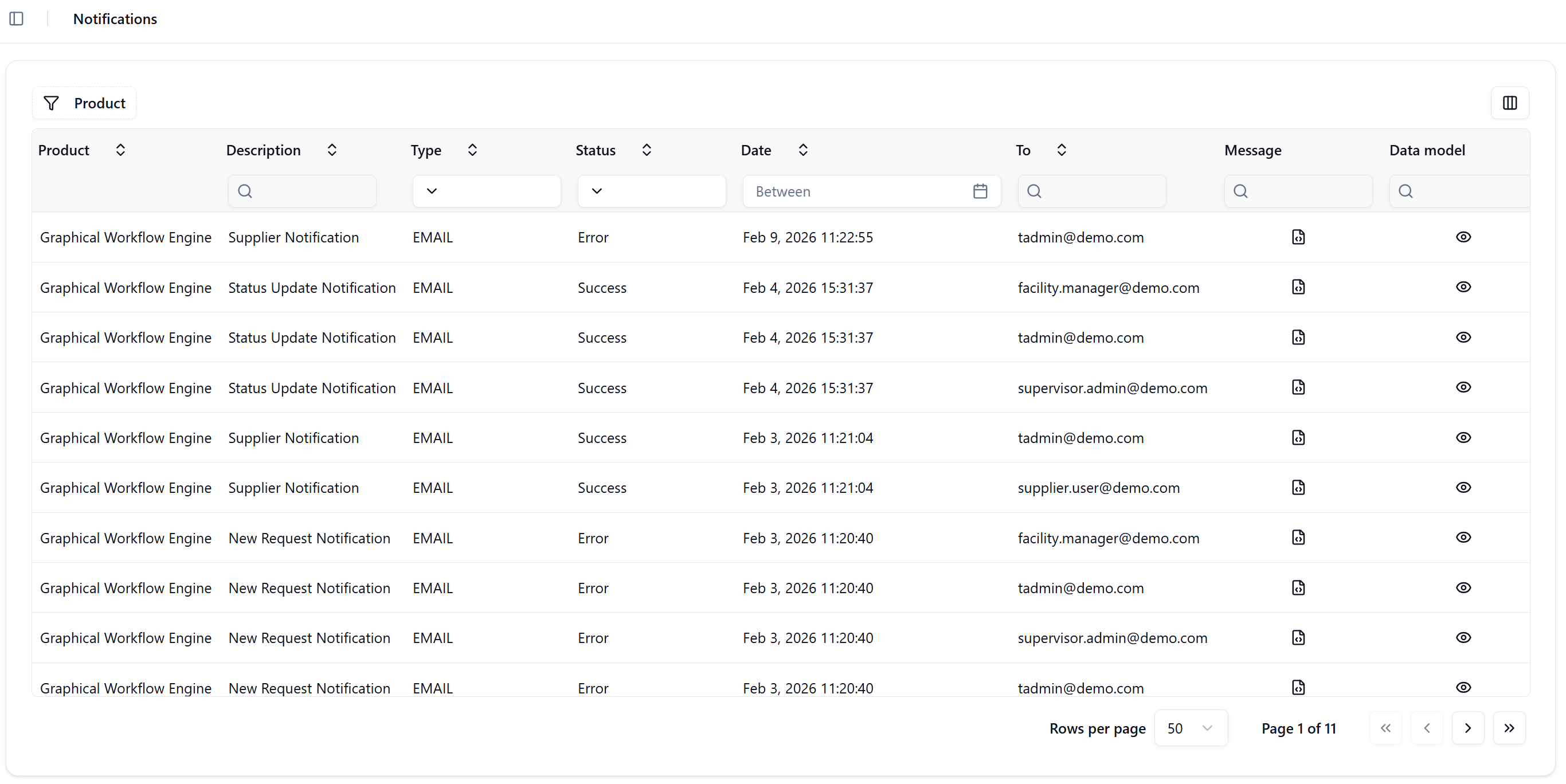
Tenant administrators have access to all notifications sent by users within their tenant through:
Navigation: Settings → Notifications
Administrators can:
- View all notifications across all applications and users
- Monitor notification delivery status (Success/Error)
- Inspect email content and data models
- Verify FreeMarker template expressions
- Troubleshoot notification failures
- Filter and search notifications by product, type, status, date range, recipient, and message content
User View
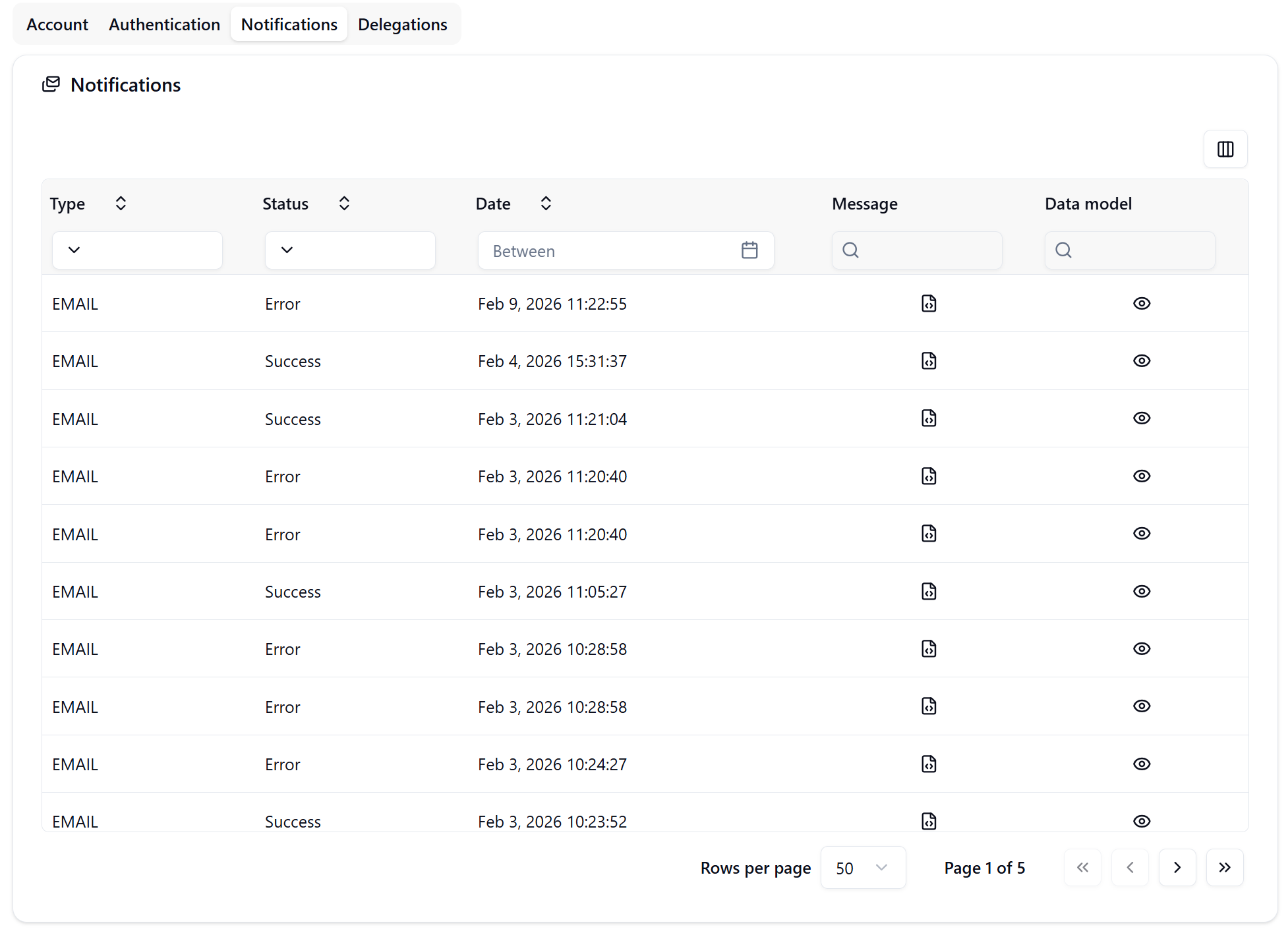
Individual users can access their own notifications through:
Navigation: Avatar Menu → Manage Account → Notifications Tab
Users can:
- View notifications sent to their email address
- Check delivery status of their notifications
- Review notification content
- Filter their personal notification history
Notification List View
Table Columns
| Column | Description |
|---|---|
| Product | The SignalSync product/application that generated the notification (e.g., "Graphical Workflow Engine") |
| Description | Notification type or template name (e.g., "Status Update Notification", "Supplier Notification") |
| Type | Communication channel (currently EMAIL) |
| Status | Delivery status: Success or Error |
| Date | Timestamp when the notification was sent |
| To | Recipient email address |
| Message | Preview/full content of the email sent |
| Data model | JSON data structure used to populate the FreeMarker template |
Filtering and Search
The notifications view provides multiple filter options:
- Product filter - Filter by application source
- Description filter - Search by notification type
- Type filter - Filter by communication channel
- Status filter - Show only Success or Error notifications
- Date range - Filter notifications by date period
- Recipient search - Find notifications by email address
- Message search - Search within notification content
- Data model search - Search within the JSON data structure
Pagination
- Configurable rows per page (10, 25, 50, 100)
- Page navigation controls
- Total page count display
Notification Details
Message Content
Click the eye icon (👁️) in the Message column to view the complete email content, including:
- Email subject line
- Full HTML-formatted email body
- Embedded links and formatting
- Warning messages (e.g., "Do not reply" notices)
Example notification message:
Dear Facility Manager,

The request with ID #1182 has been updated to status RETURNED.

Request Details:
- Request ID: 1182
- Problem Type: TEMPERATURE
- Current Status: RETURNED
- Date and time updated: N/A
- Request title/Subject: N/A
- Request Description: temperature adjustment

To track the request progress, access the system by clicking the following link: [link]

Best regards,
SignalSync Team

---
WARNING: This is an automatic message generated by the system. Please do not reply
to this email, as this email address is not monitored.
Data Model
Click the document icon (📄) in the Data model column to inspect the JSON data structure used to populate the notification template.
Example data model:
{
  "new": false,
  "wfId": "34116338-3d09-4614-80d7-a848197d6bd0",
  "status": "returned",
  "blockId": "wf-node-2-fa94",
  "details": {
    "supplier": {
      "label": "SUP005",
      "value": "1df462dc-d952-4e05-9324-59401a5a73ca"
    },
    "_building": {
      "label": "Gateway Plaza",
      "value": "0791de36-463f-4a09-8d6b-c915dea27c9d"
    },
    "_priority": "Medium",
    "supervisor": {
      "label": "FM001",
      "value": "7a3fbd95-48fb-4542-8e64-0dd02c753608"
    },
    "_description": "temperature adjustment",
    "_problem_type": {
      "label": "TEMPERATURE",
      "value": "28e4e941-71f5-499c-977a-5005fafd28f9"
    },
    "supplier_name": "HVAC Systems",
    "supervisor_name": "Facility Manager",
    "encryptedRequestId": "0c23621649"
  },
  "version": 2
}
Using Data Model for Template Validation
The data model is particularly useful for:
- Template debugging - Verify that FreeMarker expressions reference existing fields
- Data verification - Confirm the correct data is being passed to templates
- Troubleshooting - Identify missing or incorrect data causing notification errors
- Template development - Understand the available data structure when creating new templates
Example FreeMarker expressions:
${encryptedRequestId}
${requestId}
${status}
${_problem_type.label}
${_priority}
${_description}
${building.label}
${supervisor_name}
Notification Types
Workflow Notifications
Notifications generated by GWE workflows using configured notification templates. These are defined using FreeMarker templates and can include:
- Status update notifications
- New request notifications
- Assignment notifications
- Supplier notifications
- Custom business process notifications
Configuration: Notifications are configured within GWE workflow events using the Notification event type.
System Notifications
Platform-generated notifications for account and security management:
Password Reset Notification
- Trigger: User requests password reset
- Recipient: User's registered email
- Content: Secure password reset link with expiration time
- Subject: "SignalSync: Secure Password Reset Instructions"
Example:
Hi [User Name],

Someone recently requested a password change for your SignalSync account.
If this was you, you can set a new password here:

[Reset password button]

This link expires in 1 hour and can only be used once.

If you don't want to change your password or didn't request this,
just ignore and delete this message.

To keep your account secure, please don't forward this email to anyone.

- The SignalSync Team
User Activation Notification
- Trigger: New user account creation
- Recipient: New user's email
- Content: Welcome message and activation link
- Purpose: Email verification and account activation
Notification Status
Success Status
Indicates the notification was successfully:
- Generated from the template
- Processed by the email service
- Sent to the SMTP server
Error Status
Indicates a failure in the notification process. Common causes:
- Invalid recipient email address
- Template rendering errors
- FreeMarker expression errors
- SMTP server connection issues
- Missing required data in the data model
Troubleshooting errors:
- Check the Data model for missing or incorrect field references
- Verify FreeMarker expressions in the template match the data model structure
- Confirm recipient email addresses are valid
- Review SMTP configuration in Settings → Parameters
FreeMarker Template Configuration
Notifications in GWE are defined using FreeMarker templates that support:
Subject Message
Template expressions for dynamic email subjects:
#${encryptedRequestId} - ${requestId?then(requestId?c, "N/A")} -
Request Status Update
Body Message
HTML email templates with FreeMarker expressions
<#ftl encoding="UTF-8">
<meta http-equiv="Content-Type" content="text/html; charset=UTF-8">
<#setting time_zone="Europe/London">
<#setting output_encoding="UTF-8">
<#setting url_escaping_charset="UTF-8">

Dear ${recipient().name()!"N/A"},
<br><br>
A new request has been created with ID #${(requestId?c)!"N/A"}.
<br><br>
<b>Request Details:</b><br>
- Request ID: ${(requestId?c)!"N/A"}<br>
- Problem Type: ${(_problem_type.label)!"N/A"}<br>
<#if createdDate?has_content>
- Date and time created: ${dateUtils.parse(createdDate)?datetime?string("dd/MM/yyyy, HH:mm")}<br>
<#else>
- Date and time created: N/A<br>
</#if>
- Request title/Subject: ${(_title?html)!"N/A"}<br>
- Request Description: ${(_description?html)!"N/A"}
<br><br>
To track the request progress, access the system by clicking the following link:
<#if wfId?has_content && requestId?has_content>
    <a href="https://[your_domain].partners.signalsync.cloud/apps/gwe/manage/${wfId}/${requestId?c}">here</a>
<#else>
    <a href="https://[your_domain].partners.signalsync.cloud">here</a>
</#if>
<br><br>
Best regards,<br>
SignalSync Team
<br><br>
---
<br>
<span style="color: red;">
WARNING: This is an automatic message generated by the system. Please do not reply to this email, as this email address is not monitored.
</span>
Best Practices
For Administrators
- Regular monitoring - Check notification status regularly to identify delivery issues
- Error investigation - Review Error status notifications and inspect data models
- Template validation - Use the data model to verify FreeMarker expressions before deployment
- Security awareness - Monitor system notifications for unusual password reset or activation patterns
For Template Developers
- Test with data model - Always verify expressions against actual data models
- Handle missing data - Use FreeMarker default values:
${field!"Default Value"} - Null checking - Test for field existence:
<#if field?has_content> - Date formatting - Use consistent date/time formats across templates
- Escape special characters - Properly escape HTML and URL content
- Include tracking links - Provide deep links to relevant entities in the system
- Add warnings - Include "do not reply" notices for automated emails
Technical Notes
Data Storage
- Notifications are stored in the platform database
- Both successful and failed notifications are retained for audit purposes
- Data model JSON is stored for debugging and validation
Security Considerations
- System notifications include one-time-use tokens with expiration
- Password reset links expire after 1 hour
- Email addresses are validated before sending
- Administrators can monitor all notifications for security auditing