SignalSync 2026.4.0 Product Release
Release date: April 2026
Version: 2026.4.0
This release delivers the full IoT Connect module — including ThingsBoard CE integration, Background Data Process views for all core IoT entity types, and embedded navigation with white-label alignment. It also ships an Entity Builder, the SignalSync MCP Server, the Rule Chain Schedule Trigger, and a broad range of platform improvements across GWE, reports, consoles, and infrastructure.
What's New in 2026.4.0
IoT Connect
ThingsBoard CE Deployment & Infrastructure
NXT-1007 / NXT-1120 / NXT-1122 / NXT-1133IoT Connect is now available as a fully operational SignalSync product module. ThingsBoard Community Edition is deployed as a Docker microservice alongside the existing SignalSync stack, with a dedicated reverse proxy configuration exposing the required IoT endpoints (MQTT, HTTP, CoAP) to the public internet.
The infrastructure setup includes:
- ThingsBoard CE running as an isolated Docker service within the SignalSync microservices network
- Reverse proxy rules for public MQTT broker access (used by LoRaWAN gateways and field devices)
- Tenant-level IoT Connect product setup with SignalSync product hierarchy integration
ThingsBoard Dashboard Viewer
NXT-1143Users with access to the IoT Connect product can now view ThingsBoard dashboards directly embedded inside SignalSync, without leaving the application. The Dashboard Viewer is available as a dedicated navigation entry within the IoT Connect product and loads the ThingsBoard UI inside a secure iframe, with full branding and white-label alignment applied.
The viewer respects the user's ThingsBoard tenant context, ensuring each SignalSync tenant sees only their own dashboards.
ThingsBoard Rule Chain Viewer & Editor
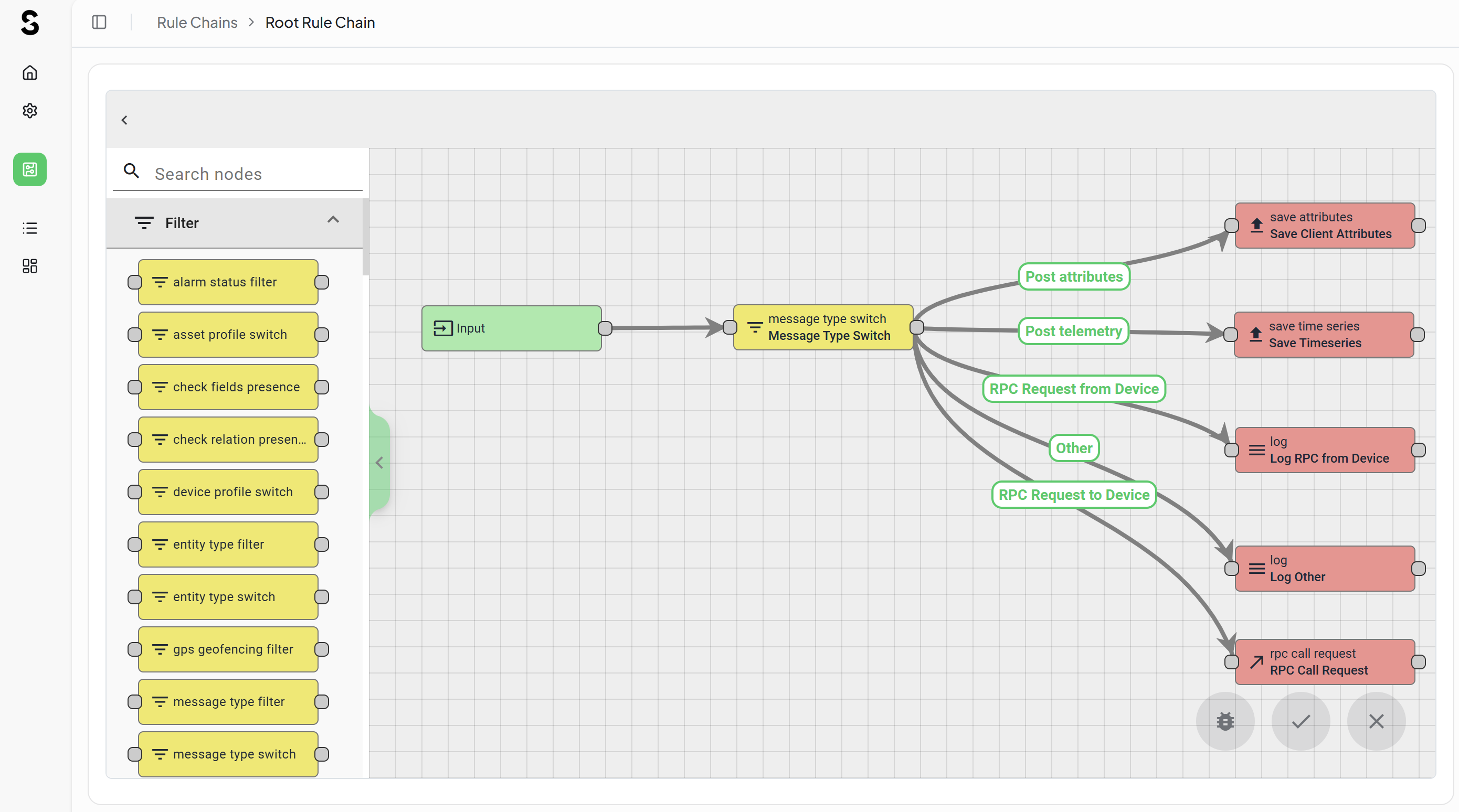
NXT-1144The IoT Connect module now includes a Rule Chain Viewer & Editor, allowing authorized users to browse and edit ThingsBoard rule chains directly from within SignalSync. This eliminates the need to switch to the ThingsBoard administration interface for rule chain configuration, keeping the IoT workflow management experience within the SignalSync shell.
Click to view ThingsBoard Rule Chain Editor interface
White Labelling & Branding Alignment for Embedded Navigator
NXT-1181The ThingsBoard embedded navigator has been updated to align with the tenant's SignalSync white-label configuration. The embedded header, logo, and color scheme now reflect the tenant's branding settings rather than the default ThingsBoard appearance, providing a consistent user experience across the integrated platform.
IoT Connect — Background Data Process Views
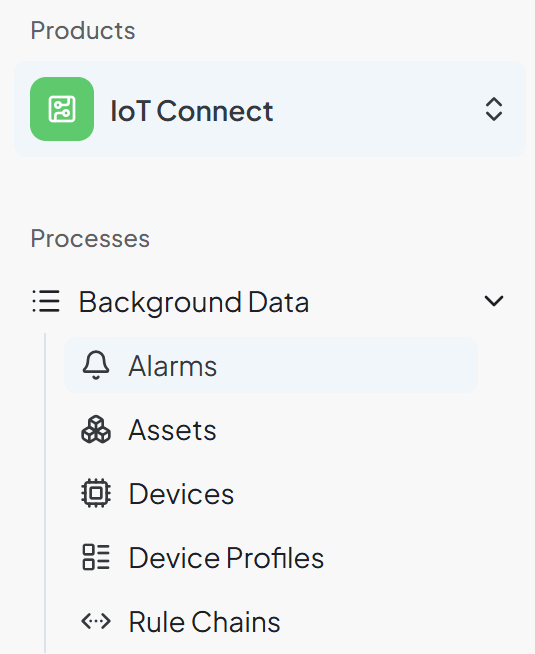
NXT-1135 / NXT-1136 / NXT-1137 / NXT-1140Background Data Process (BDP) views are now available for all core ThingsBoard IoT entity types, accessible directly from the SignalSync navigation:
| Background Data Process | Description |
|---|---|
| Assets | Browse and manage ThingsBoard asset records, with filtering by asset type and customer assignment |
| Devices | View device inventory, connectivity status, and attribute values |
| Device Profiles | Browse and manage device profiles that define transport and provisioning settings |
| Alarms | View active and historical alarms across all devices, with severity and status filtering |
Each Background Data Process view retrieves data live from ThingsBoard via the IoT Connect integration layer, without duplicating records in the SignalSync database.
Click to view IoT Connect - BDP
Entity Builder
Entity Definition, Relationships & Master Data Migration
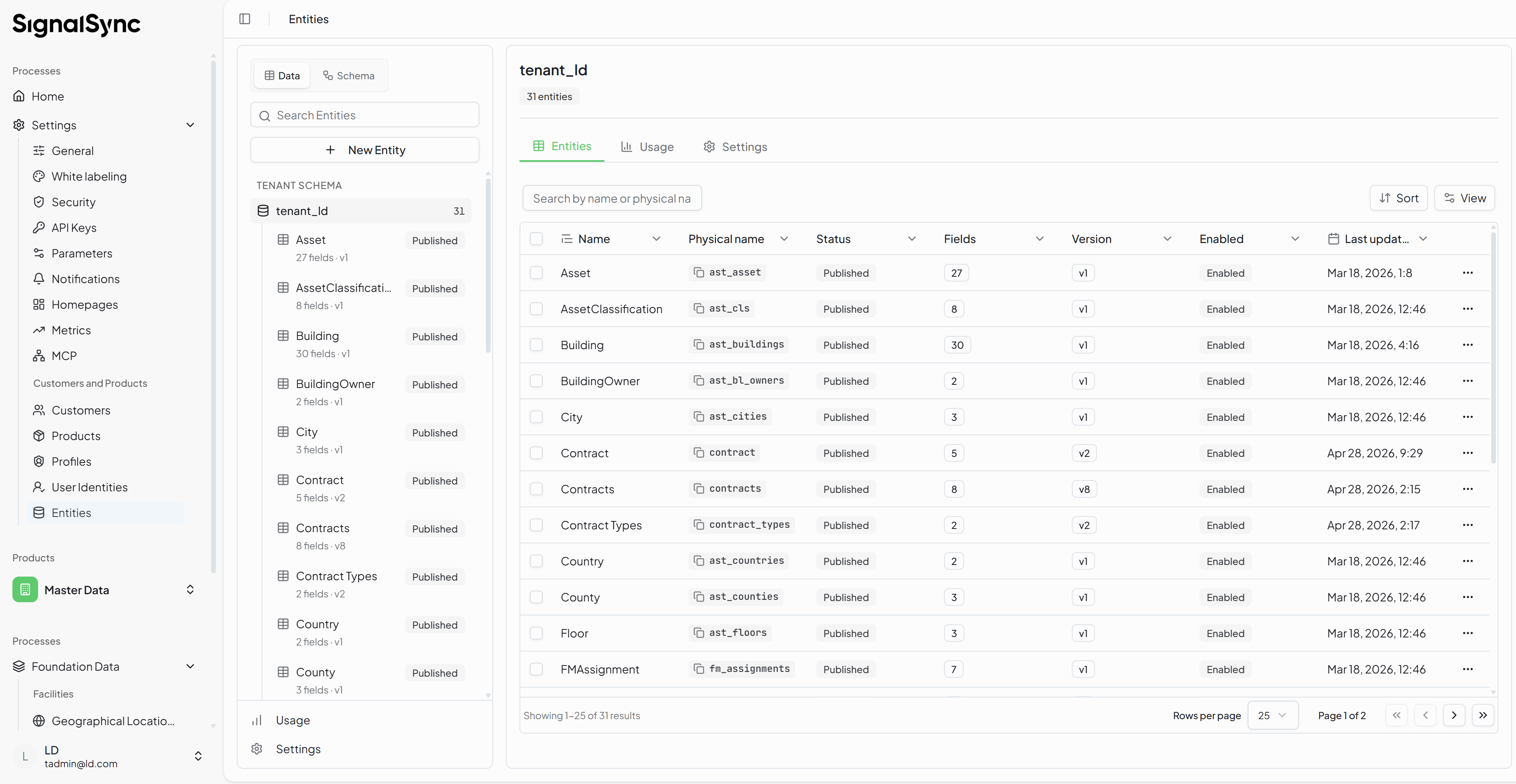
NXT-1126The Entity Builder enables Tenant Administrators to define custom entity types directly from the SignalSync administration interface, without requiring database schema changes or developer involvement.
Key capabilities delivered:
- Entity definition — create a named entity type with a configurable set of typed attributes (text, number, date, select, boolean, lookup)
- Relationships — define associations between entity types, including one-to-many and many-to-many relationship configurations
- Master data migration — existing master data records can be imported into the new entity structure, preserving historical data while adopting the new schema
Click to view Entity Definition interface
Form Designer, Layout & Publishing
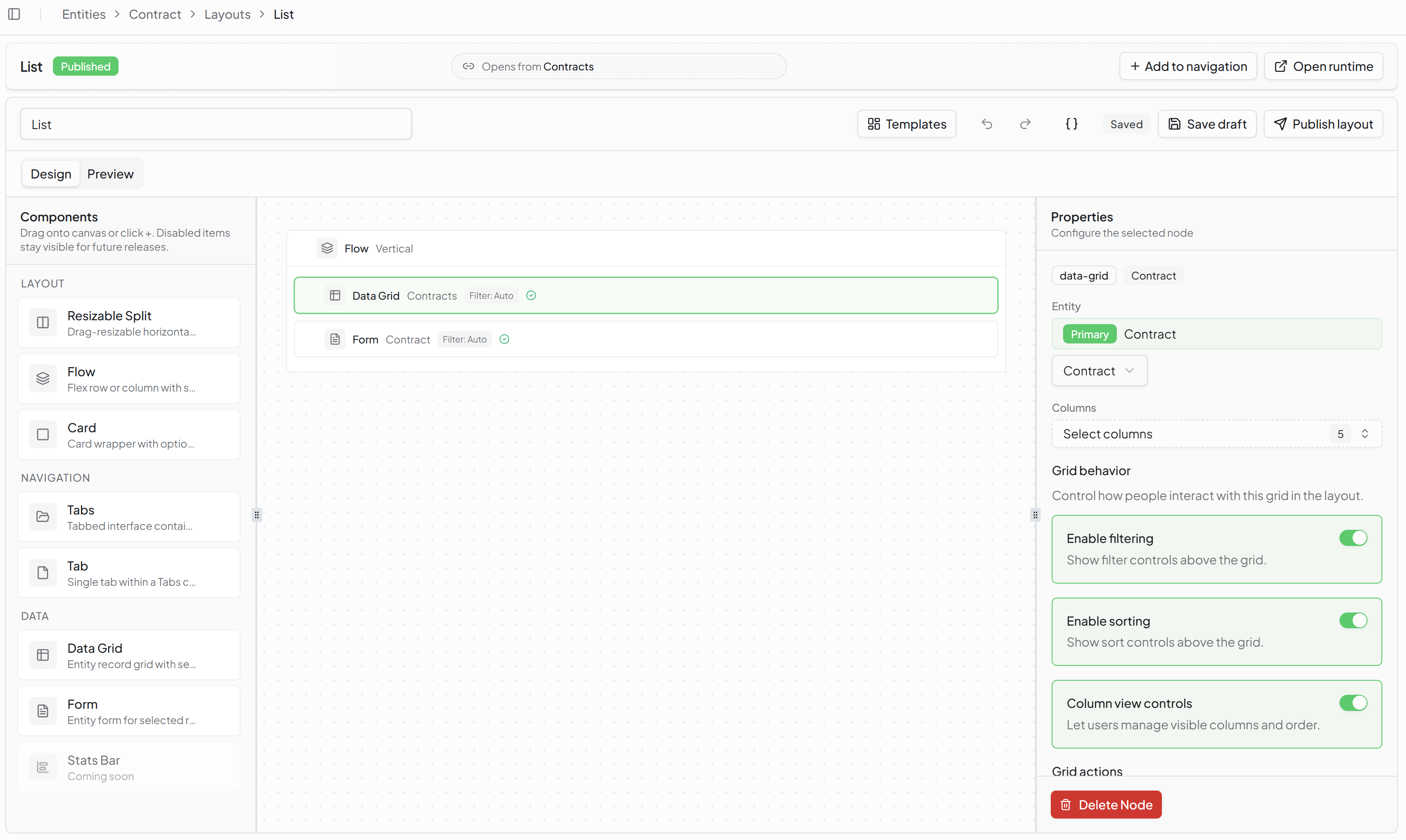
NXT-1127Once an entity is defined, administrators use the Publish Wizard to design the form layout and expose the entity as a navigable Background Data Process view within the SignalSync product hierarchy.
The wizard covers:
- Field selection — choose which attributes are displayed in the list view and the detail view
- Layout configuration — arrange fields into sections and define the column layout for the Background Data Process view
- Publication — register the Background Data Process view as a task within the product hierarchy, making it accessible to users with the appropriate profile permissions
Once published, the Background Data Process view behaves like any other SignalSync console, supporting filtering, sorting, record creation, and edit operations.
Click to view Entity Layout & Publishing interface
The next release will extend the Entity Builder with full GWE and Rule Chain integration (NXT-1128), enabling custom entities to appear as selectable options in GWE form fields and in Rule Chain Entity Operation nodes — allowing designers to build complete data-driven workflows and automation chains around custom entity types.
SignalSync MCP Server
MCP Server Implementation
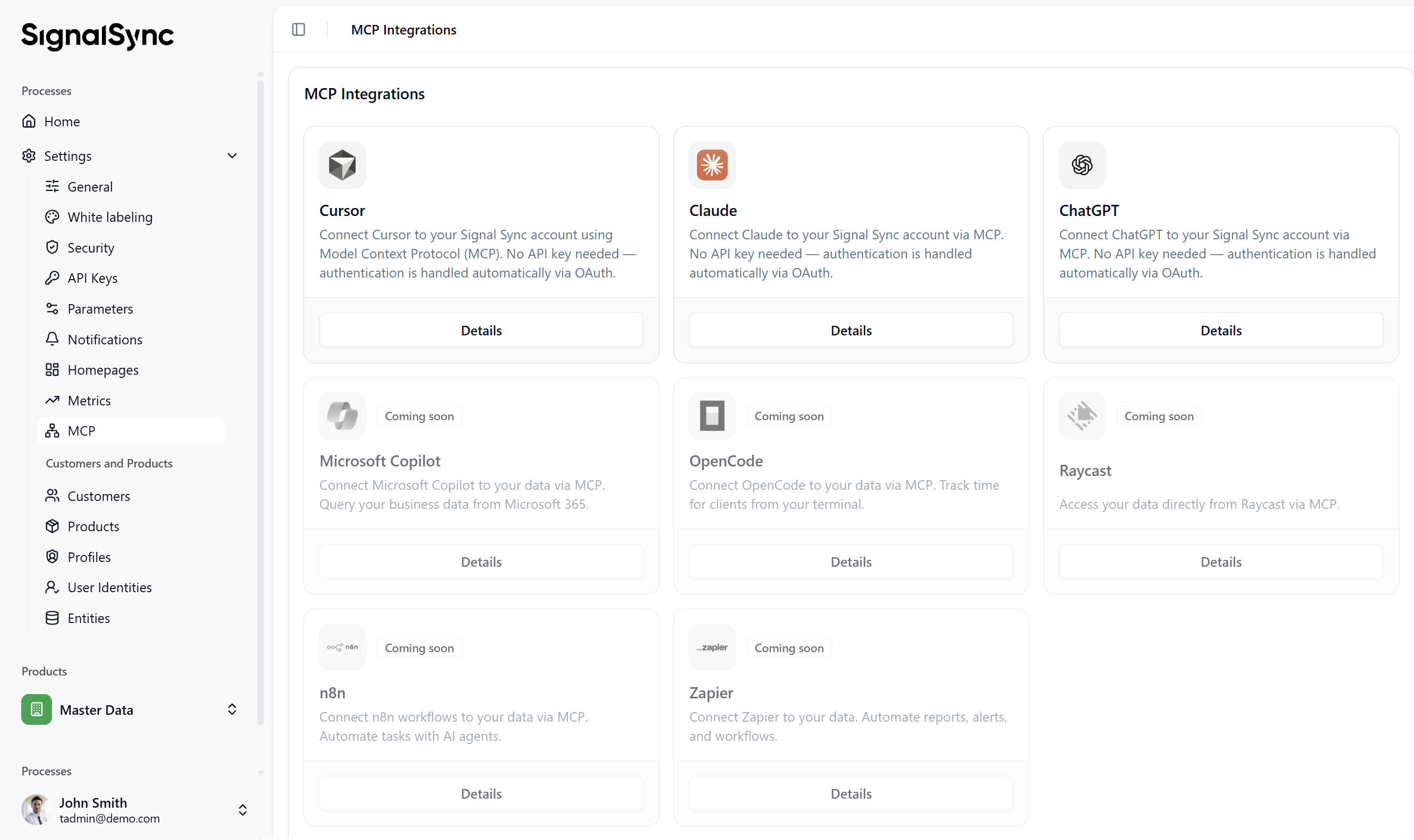
NXT-1092 / NXT-1129 / NXT-1130 / NXT-1131SignalSync now exposes a Model Context Protocol (MCP) server at api.signalsync.cloud/mcp, enabling AI assistants and external developer tools to query workflow data using natural language and structured tool calls.
The implementation covers:
- OAuth 2.0 provider via
better-authatauth.signalsync.cloud, enabling secure delegated access for MCP clients - MCP server endpoint built on the Hono framework within
service-api, following the Streamable HTTP transport specification - Tenant isolation enforced through JWT claims — each authenticated session is scoped to a single tenant and cannot access data from other tenants
query_workflow_requeststool — the initial read-only tool, supporting filtering by workflow, status, date range, and custom fields
The MCP server is designed for read-only reporting use cases in this release. Write operations and additional tools will be introduced in subsequent releases.
Click to view SignalSync MCP Server interface
Rule Chains
Schedule Trigger
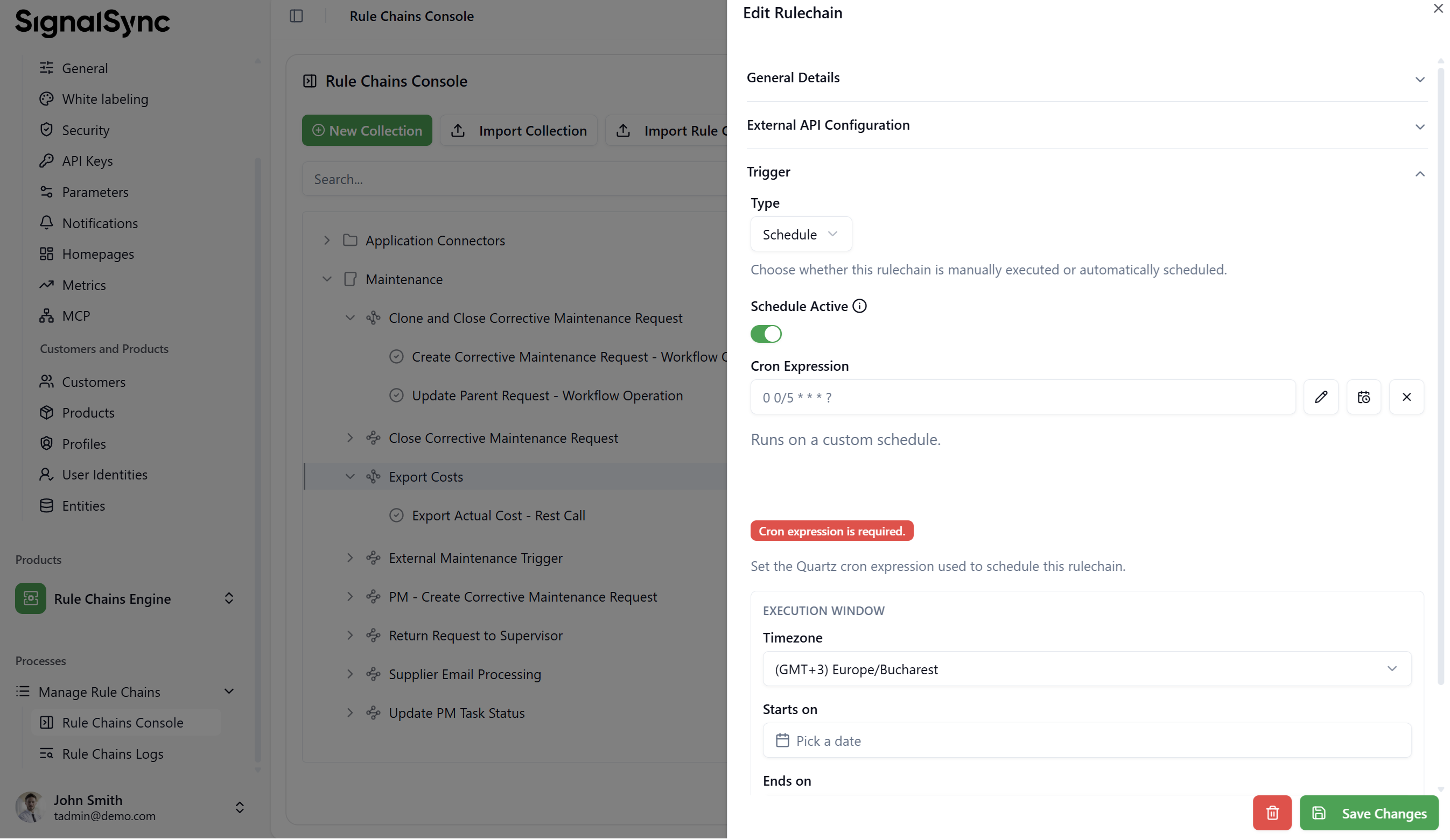
NXT-1141Rule Chains can now be triggered automatically on a configurable cron schedule, without requiring any user action to initiate execution. This enables fully automated background processing scenarios such as:
- Periodic data synchronization with external systems
- Automated report generation and distribution
- Scheduled API polling and notification workflows
- Time-based data enrichment and cleanup tasks
The schedule is configured directly on the Rule Chain definition using a cron expression, with support for standard minute, hourly, daily, weekly, and monthly intervals. Execution is tenant-scoped and logged in the Rule Chain execution history.
Click to view Rule Chain Schedule Trigger interface
GWE — Workflows & Forms
Home Page Widgets — Workflow Version Selection
NXT-1063Home Page widgets that display workflow data can now be configured to target a specific workflow version, rather than always displaying data from the latest published version.
This is particularly useful for tenants running multiple active workflow versions simultaneously, or for historical analysis that requires comparing data from a previous version against the current one. The version selector is available in the widget configuration drawer and lists all published versions of the configured workflow.
GWE Form View — Date Created in Request Header
NXT-1164The request header area in the GWE Form View now includes the Date Created field alongside the existing Request ID and Status. This provides immediate visibility of when a request was submitted, without requiring users to scroll to a form field or open the request history.
PM Tasks — Exclude Inactive Buildings from Scheduling
NXT-1171Preventive Maintenance task scheduling now filters out inactive buildings when generating recurring requests. Previously, PM tasks could generate requests for buildings that had been deactivated, creating unnecessary workload and misleading open request counts.
With this change, only buildings with an active status are included in PM scheduling cycles, and no new requests are generated for inactive locations.
Reports & Management Console
Report Chart Drilldown — Navigate to Request Detail
NXT-1170Clicking on a bar, segment, or data point in a Report Builder chart now navigates directly to the corresponding request detail view inside the Management Console. Previously, users had to manually search for the request after identifying it in the chart.
The drilldown passes the relevant filters (workflow, status, date range, grouping value) to the Management Console, opening the detail view pre-filtered to the exact record set represented by the selected chart element.
Locations — File Upload Fields in Other Details Section
NXT-1172The Locations module now supports file upload fields in the Other Details section of a location record. Administrators can attach documents such as floor plans, occupancy certificates, inspection reports, and photographs directly to a location, making relevant documentation accessible from within the location record without relying on external document management systems.
Uploaded files are stored in the SignalSync document storage layer and respect the tenant's configured file size limits.