SignalSync 2026.6.0 Product Release
Release date: June 2026
Version: 2026.6.0
This release introduces the redesigned Rule Chains Console, a graphical canvas where nodes are inserted from a searchable menu and connected visually to build automations, replacing the old tree-based node editor. It also ships the new Universal Alert System, letting alerts be raised on any field of any business entity, extends the Entity Builder with full GWE and Rule Chain integration, adds a configurable filter bar to the Management Console, and delivers a broad set of improvements across IoT Connect, GWE, and the SignalSync MCP Server.
What's New in 2026.6.0
Rule Chains Console
Visual Node Editor
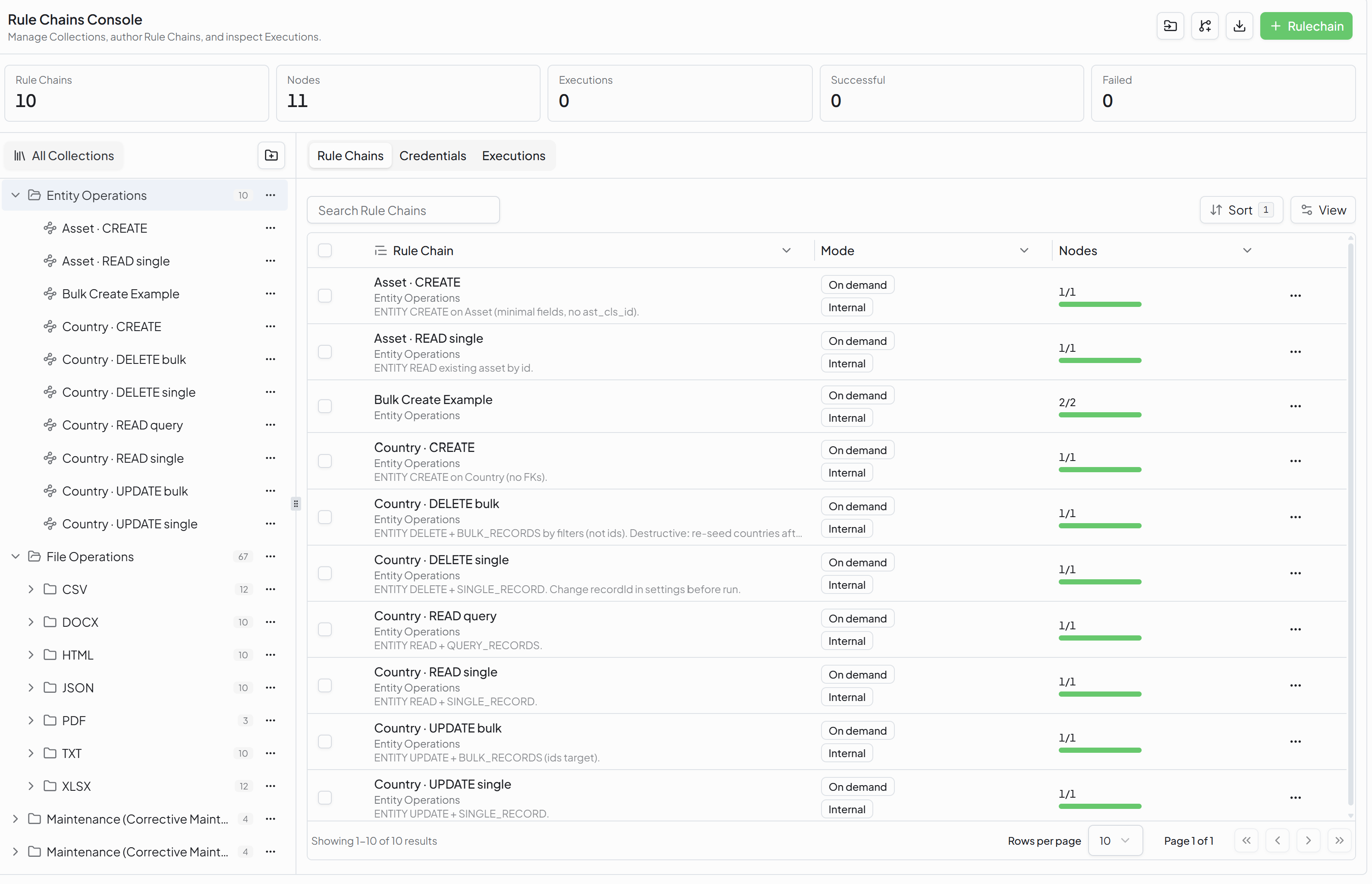
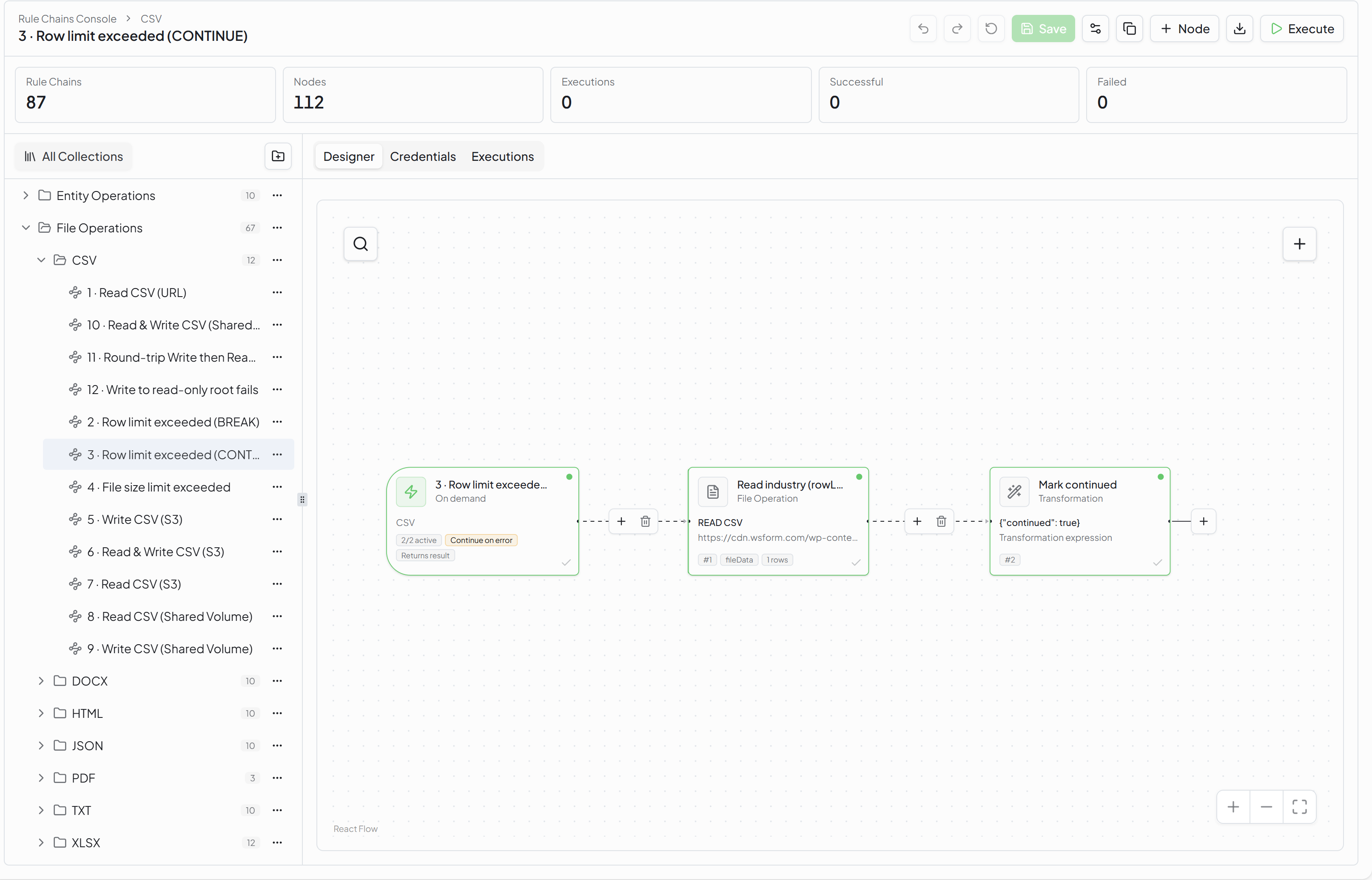
NXT-1020The Rule Chains module has been completely redesigned. The previous tree-based navigation has been replaced with the new Rule Chains Console—a modern visual designer that enables users to build, configure, and maintain rule chains using an intuitive drag-and-drop interface.
Rule Chain authors can now:
- Insert new nodes from the node search panel, connect them into the flow, and delete them with a single click — all on a visual canvas instead of a nested tree
- See the full flow of a Rule Chain at a glance, including branching and conditions
- Build and modify automations faster, with a shallower learning curve for new users
All existing Rule Chains have been migrated to the new visual format automatically — no manual rework is required.
Click to view Rule Chains interface
Click to view Rule Chains Editor interface
Global Credentials
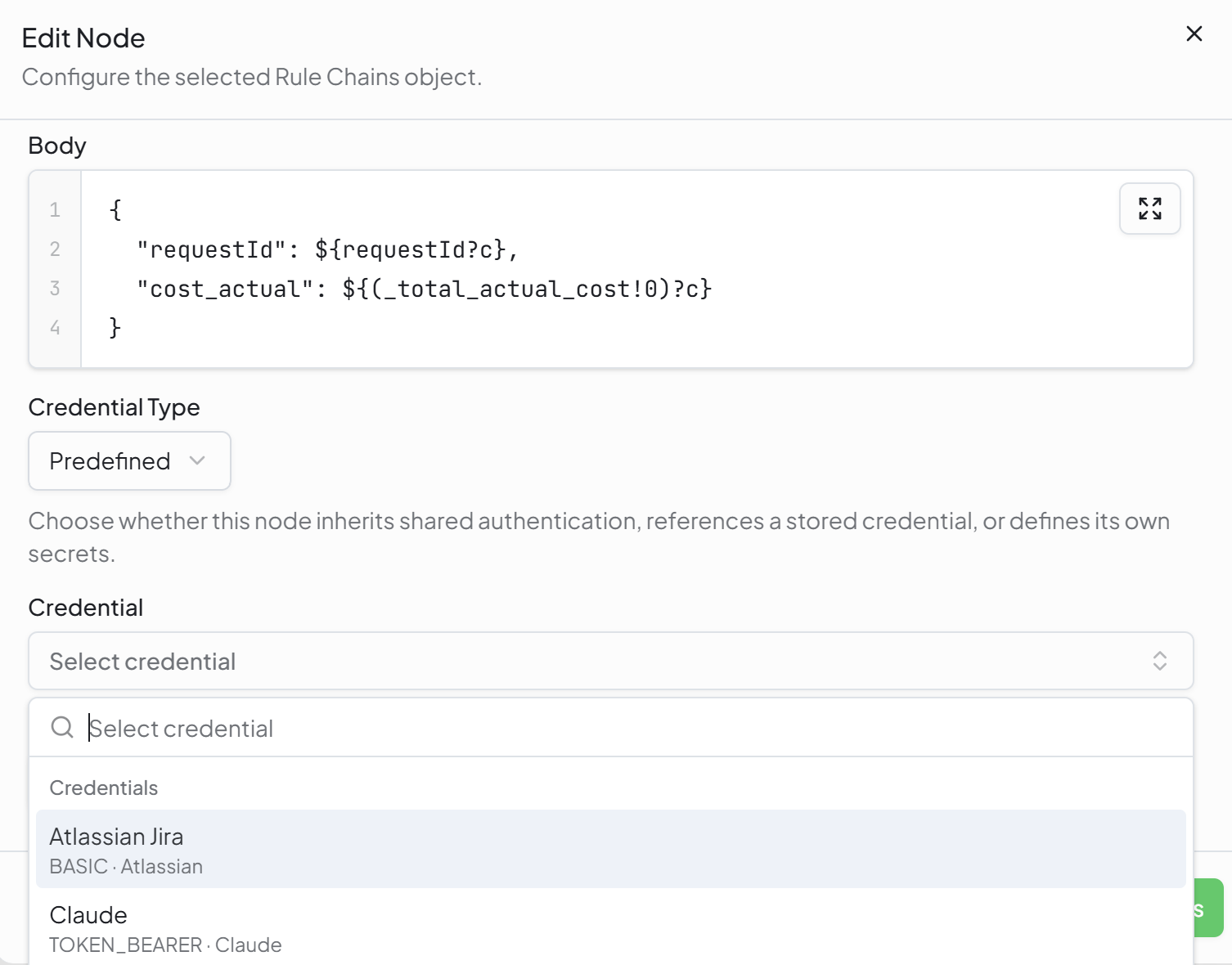
NXT-1251Rule Chains now include a dedicated Credentials tab where reusable authentication profiles can be created once and reused across any number of Rule Chains and REST Call nodes, instead of being configured separately in each chain.
On a REST Call node, the Credential Type field lets you choose how authentication is resolved: Inherit shared authentication from the Rule Chain, select a Predefined stored credential from the list, use a one-off Generic credential defined on the node itself, or None.
Click to view Global Credentials interface
File Operation Node
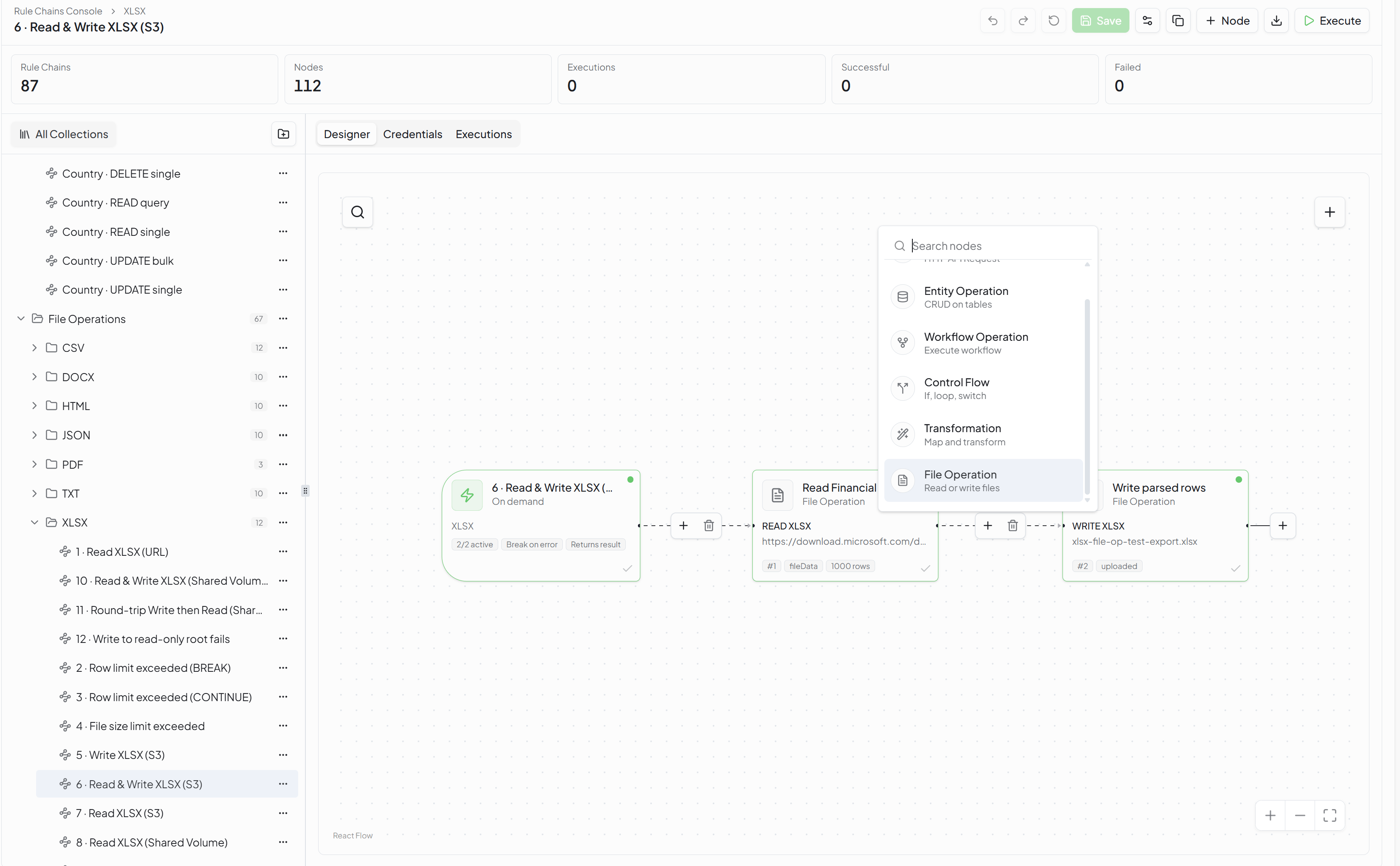
NXT-1142A new File Operation node type is available in the Rule Chains Editor. It allows a Rule Chain to generate a file from the output of a previous node and store it in SignalSync's internal storage or a shared folder, or to read a structured file and feed its content into the rest of the automation for further processing.
Click to view File Operation Node interface
Entity Payload Helper for Workflow Operation Nodes
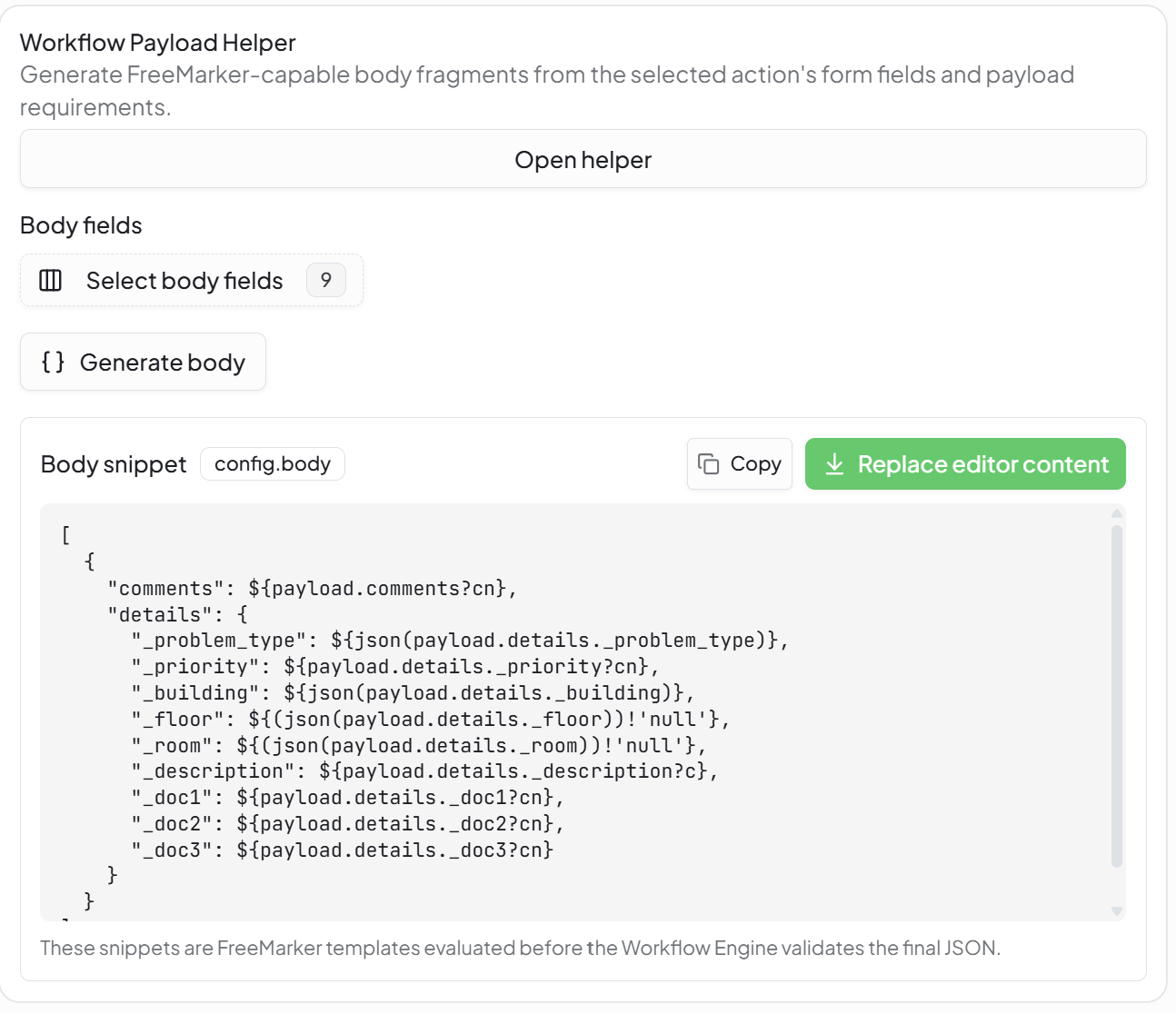
NXT-1235The Entity Payload Helper is now available on Workflow Operation nodes (Initialize Workflow, Perform Action, Update Request Details) and Entity Operation nodes. Rule Chain authors can generate the request payload directly from the target workflow's form definition, without needing to inspect the form or entity structure manually.
Click to view Payload Helper interface
Read Request Details Before Acting
NXT-1280The Workflow Operation node gains a new Get Details operation type, letting a Rule Chain read a request's current data before deciding how to act on it. This is particularly useful when syncing data between related workflows, where only specific fields or rows need to be updated while the rest of the request must be preserved.
Schedule Trigger Improvements
NXT-1184Following feedback on the Schedule Trigger introduced in the previous release, the scheduling screen now offers two modes:
- Basic — a simplified, single-input view for common recurring schedules, selected by default for new schedules
- Advanced — the full set of scheduling options for more complex recurrence patterns
Both modes share the same execution window settings (timezone, start date, end date).
Universal Alert System
Alert Rules, Inbox & Automated Evaluation
NXT-821 / NXT-1177 / NXT-1179 / NXT-1180SignalSync introduces the Universal Alert System, a new way to get notified automatically when important conditions arise on any business entity — contracts, leases, equipment, assets, and more.
Tenant administrators define alert rules through a guided setup:
- General — choose the entity the rule monitors and how alerts are grouped
- Filter conditions — narrow the rule to a specific subset of records
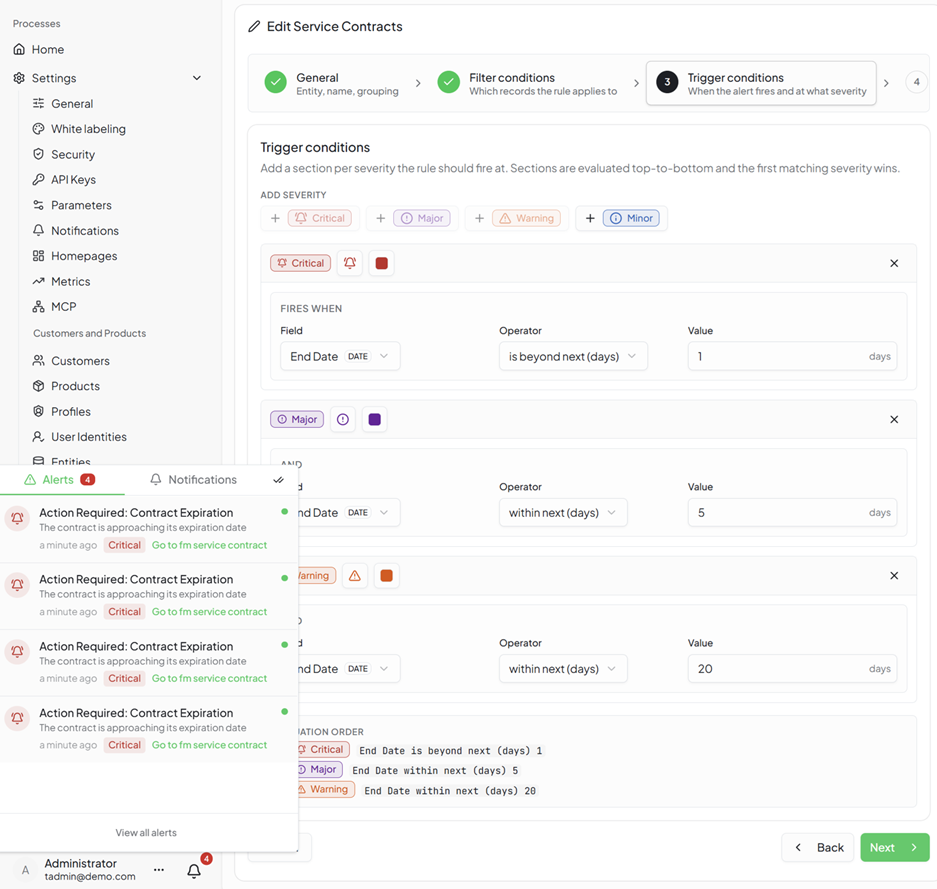
- Trigger conditions — define one or more severity levels (Critical, Major, Warning, Minor), each with its own condition built from any field on the entity — text, number, date, or enum — combined with operators such as "is less than" or "is more than N days before." Sections are evaluated top-to-bottom, and the first matching severity wins
- Clear condition — define when an active alert should automatically resolve
- Notifications & Actions — choose who is notified, through which channels, and whether an optional Rule Chain automation should also run
Once configured, alerts are evaluated automatically on a daily schedule. Users see their active and historical alerts in a new Alerts inbox, where they can view the affected record, acknowledge an alert, reassign it to a colleague, add comments, and clear it once resolved — all without leaving SignalSync.
Click to view Alerts interface
Entity Builder
GWE & Rule Chain Integration
NXT-1128Custom entities created in the Entity Builder can now be used everywhere system entities already are. They appear as selectable options in the GWE Form Designer's Entity field type and in Rule Chain Entity Operation nodes, allowing designers to build complete data-driven workflows and automations around their own custom entities, with no coding required.
Entity Layout Designer & Layout Publication Improvements
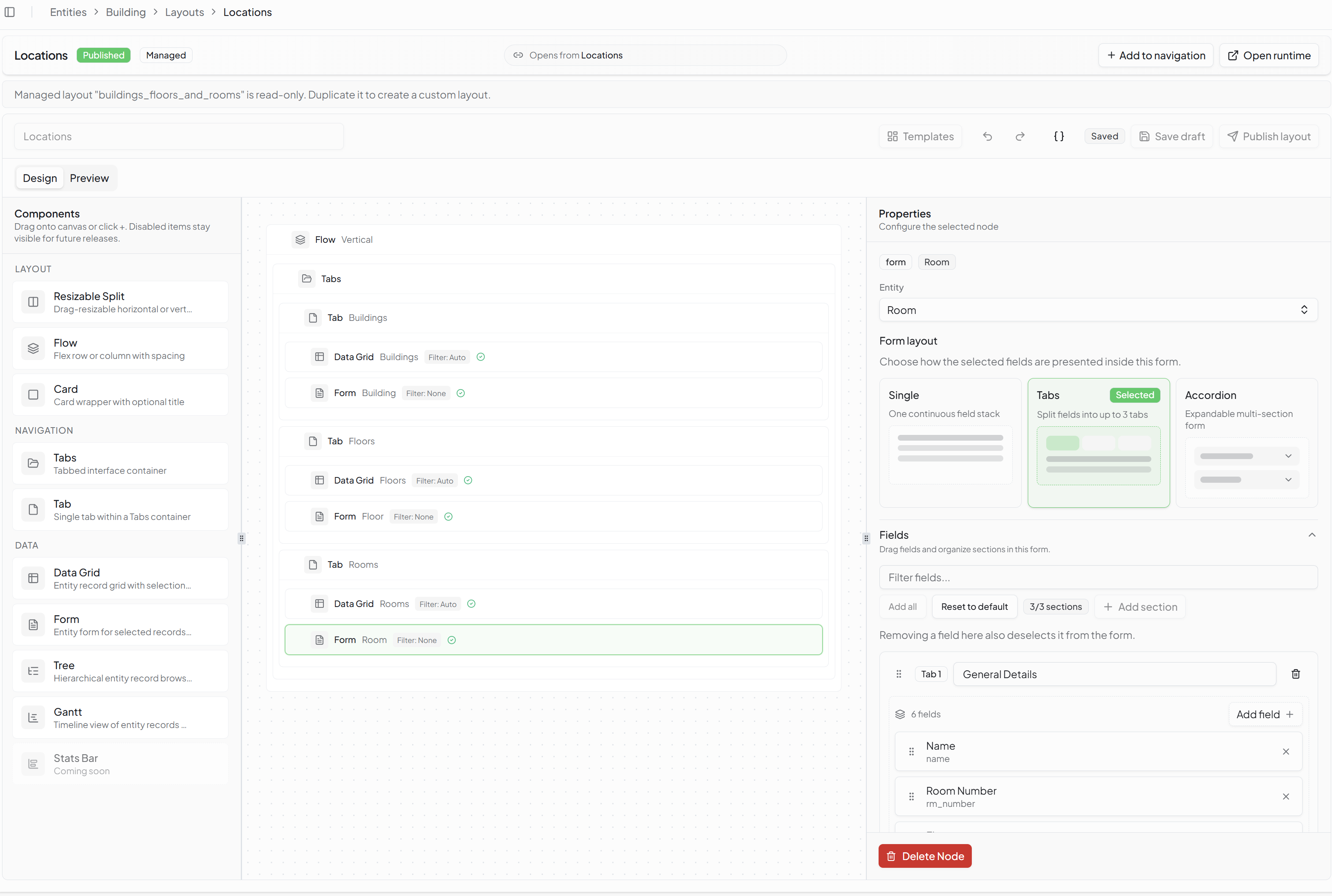
NXT-1254The Entity Layout Designer now offers a full component-based canvas for building entity views. Administrators can drag components — Data Grids, Forms, Tabs, Trees, Gantt timelines, and more — onto the canvas and arrange them freely to build layouts of any complexity, from a simple list-and-form view to multi-tab, multi-entity screens with nested navigation.
To make getting started easier, a set of Layout Templates is available as a starting point — including List, Split View, Tabbed Form, Sectioned Form, Tree, and Related Records — which can then be customized further on the canvas. More templates will be added in upcoming releases.
Alongside the designer, several usability improvements have been made based on real-world usage:
- Relation selectors (e.g. choosing an Employee or Supplier on a form) now show the configured display fields instead of raw internal IDs
- A new Icon field type is available for entity attributes
- General improvements to the layout publication flow, making it clearer and faster to publish an entity as a usable view
Click to view Layout Designer interface
Field Dependencies for Form Nodes
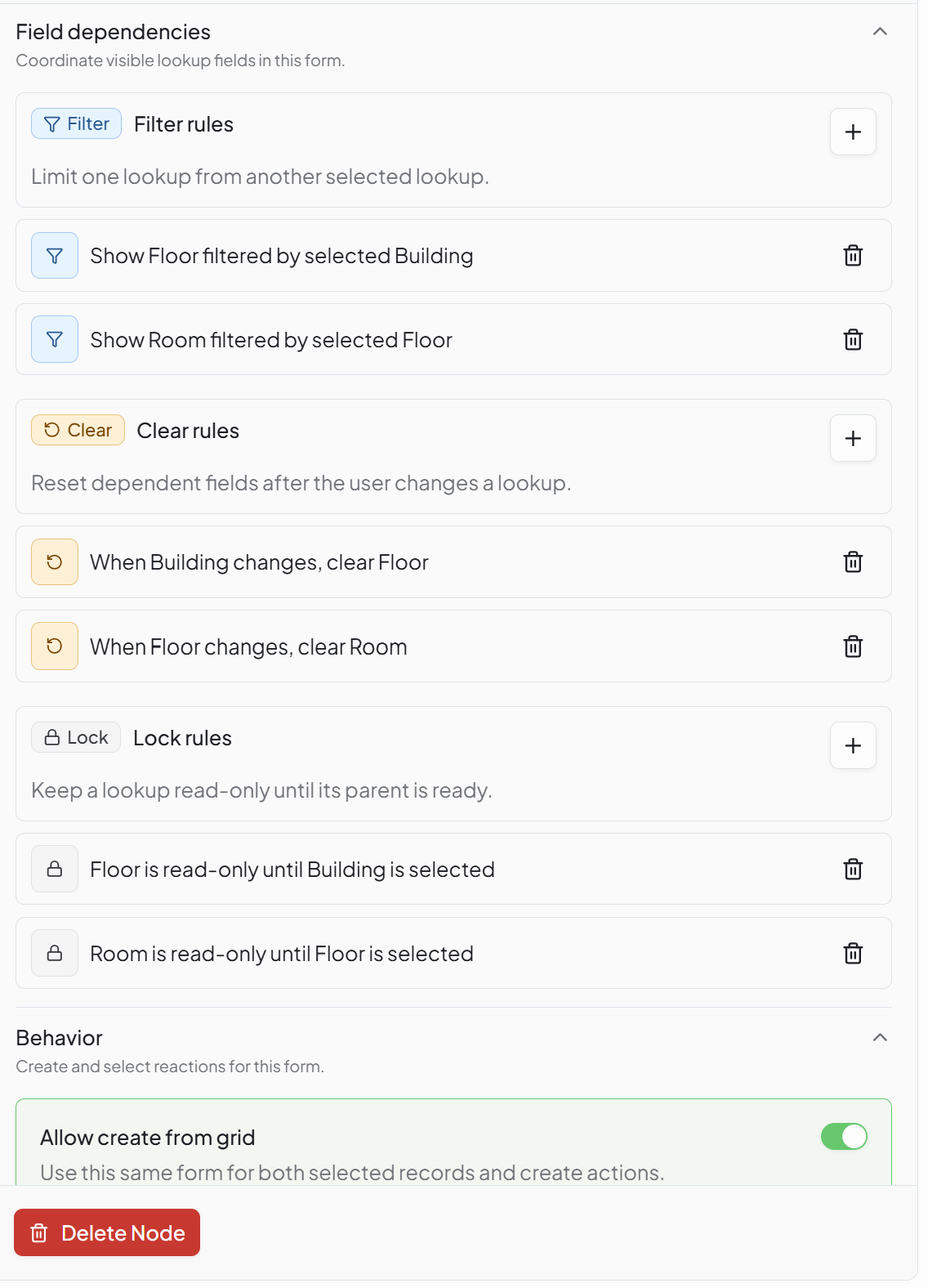
NXT-1258The Entity Layout Designer now supports field dependencies between related lookup fields on a form. For example, on a form with Building → Floor → Room fields, selecting a Building now automatically filters the Floor options to that building, and Room options to the selected Floor — preventing users from saving inconsistent location data.
Click to view Field Dependencies interface
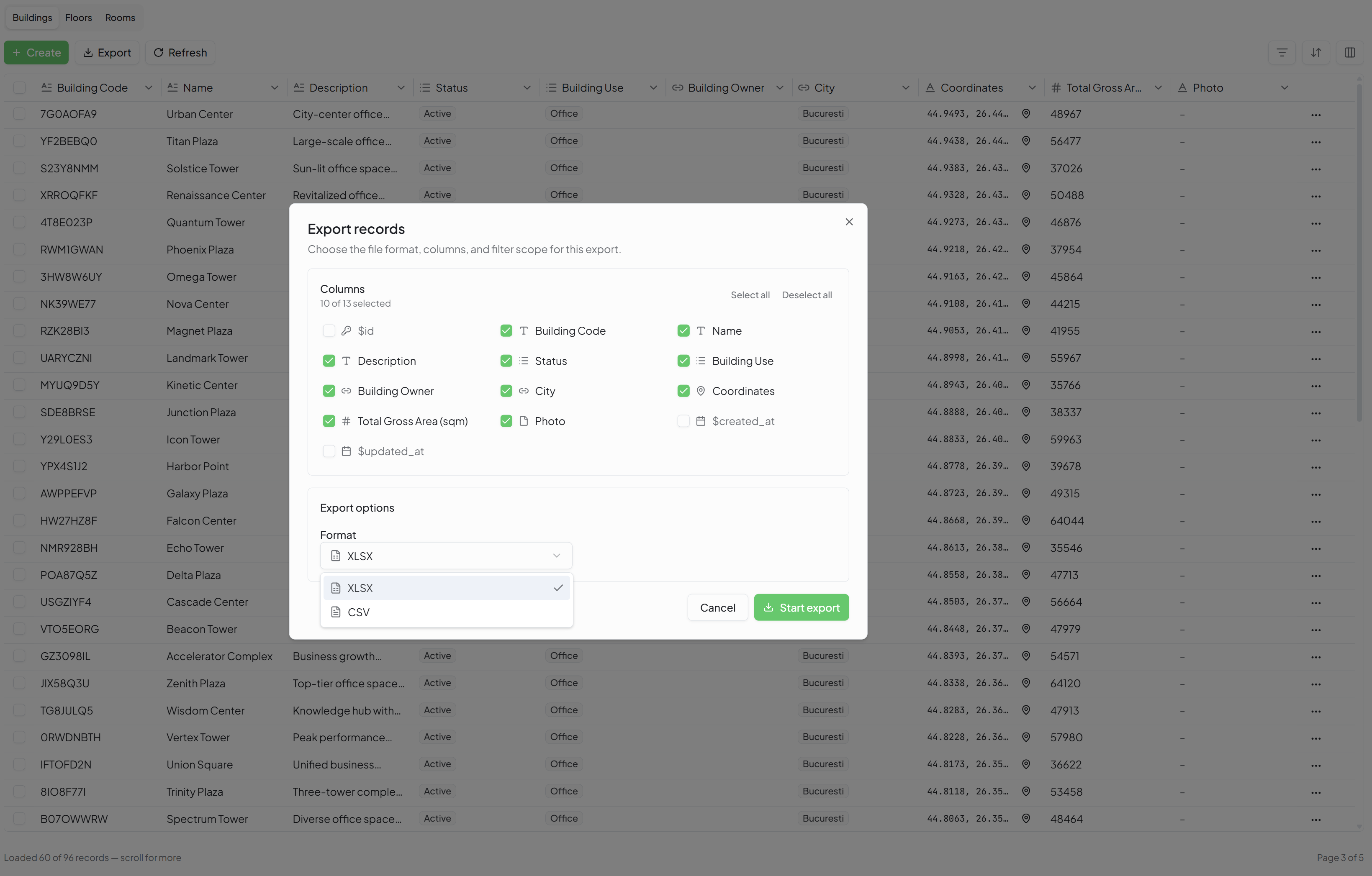
Export Records to XLSX / CSV
NXT-1263Records shown in an Entity Data Grid can now be exported to XLSX or CSV, so users can work with the data offline, share it, or bring it into other reporting tools. The export respects the tenant's configured maximum record limit.
Click to view Export interface
Homepages, Reports & Metrics Now Use Entities
NXT-1247Homepage widgets, reports, and metrics that reference core business data (locations, assets, employees, suppliers, and similar) now read from the tenant's own entity definitions rather than the legacy static data model. This ensures dashboards and reports stay consistent as tenants extend or customize their entities through the Entity Builder.
Management Console
Configurable Filter Bar
NXT-1204Console creators can now choose which fields appear as filter chips in the toolbar of a Management or Requestor console, instead of always seeing the same fixed set of filters (Workflow, Requestor, Status, Show Archived Items).
For each field enabled as a filter, the console creator can:
- Set a default value that is pre-applied when the console opens
- Override the display label shown to end users
This makes it possible to tailor each console's filters to the workflows and fields that actually matter for that console's users.
Entity-Based Filters
NXT-1228Filter chips based on an Entity field now resolve their options from the tenant's own entities defined in the Entity Builder, in addition to the platform's built-in lookup lists, so custom entities work as filters wherever the configurable filter bar is used.
GWE — Workflows & Forms
Workflow Validation on Publish
NXT-1114When publishing a workflow, the GWE Designer now validates the default (MAIN) action on every decision point in the workflow. If a structural issue is found, the designer is informed immediately and guided to fix it, rather than discovering the problem later when users start submitting requests.
Dynamic File Attachments in Notifications
NXT-1248Workflow notifications can now automatically attach files that were uploaded or generated dynamically during a request — for example, a file produced by a Rule Chain and stored in a form's file field. Previously, notifications could only reference such files by an internal identifier rather than attaching the actual file.
More Reliable Email-to-Request Matching
NXT-1183The email processing system that links incoming supplier or requestor emails to the correct request can now also recognize the request code when it appears in the body of the email, not only in the subject line. This covers cases where email clients strip or alter the subject line, so fewer emails are missed.
IoT Connect
Device Profile Alarm Rules
NXT-1173Tenant administrators can now define and manage device alarm rules directly from the Device Profile editor in SignalSync, without needing to access the ThingsBoard administration interface separately.
Device Details — Telemetry, Attributes & Relations
NXT-1194The Device Details view has been extended with three new tabs — Latest Telemetry, Attributes, and Relations — giving direct visibility into live sensor readings, device metadata, and related entities from the Devices list, without navigating away.
Telemetry Storage Performance
NXT-1209The underlying storage used for IoT telemetry data has been upgraded to better handle high-volume, high-frequency sensor data, improving write performance and scalability for tenants with large device fleets. This is an infrastructure-level improvement and requires no action from end users.
SignalSync MCP Server
Expanded Toolset — Aggregation & Metadata Tools
NXT-1234The SignalSync MCP Server's toolset has been expanded well beyond the original read-only request query. In addition to query_requests, the connector now exposes:
query_requests_count— get the number of requests matching a set of filters, without pulling back every recordquery_requests_aggregate— compute sums, averages, minimums, and maximums over request data (e.g. total cost, average resolution time)query_workflow_fields— discover the fields available on a workflow, useful for building more precise queriesget_current_date— resolves the current date server-side, so relative date filters (e.g. "this month," "last 30 days") work reliably
Combined with the existing query_workflows_definition tool, this lets AI assistants answer reporting-style questions directly — "how many open requests do we have this week," "what's our average cost per request" — without exporting data manually.
SignalSync Slim Connector
NXT-1234A new SignalSync Slim MCP connector is now available alongside the standard connector. It exposes the same read-only toolset in a reduced, more focused form, aimed at integrations and AI clients that benefit from a smaller tool surface.
Faster Approval for Read-Only Queries
NXT-1199The MCP server's tools are now explicitly marked as read-only. AI assistants such as Claude can recognize this and auto-approve these queries by default, instead of asking for confirmation every time a read-only request is made.
Improved Compatibility with Local & Open-Source AI Models
NXT-1234The MCP server's tool definitions have been refined to work reliably with a wider range of AI models, including smaller local and open-source models, in addition to Claude.