Nodes
A Node is a single processing step within a Rule Chain. Nodes are executed sequentially according to their Execution Order value. Each node has a specific Node Type that determines its behaviour and configuration fields.
Common Fields
Every node, regardless of type, shares the following fields at the top of the Edit Node drawer:
| Field | Description |
|---|---|
| Active | Toggle to enable or disable the node without deleting it. Disabled nodes are skipped during execution. |
| Execution Order | An integer that determines the position of the node in the execution sequence. The engine executes nodes sequentially, from the lowest to the highest order value. |
| Name | A descriptive label for the node as shown in the tree. Use naming conventions that reflect the action, e.g. Close Request or Get Work Logs. |
| Rulechain | The Rule Chain this node belongs to. Changing this field moves the node to a different Rule Chain. |
| Node Type | The type of processing this node performs. Selecting a type changes the fields shown below. |
The Create node button saves a new node; Save Changes saves edits to an existing one. The 🗑 delete button permanently removes the node and its execution history.
When modifying the execution order, keep in mind that other nodes might rely on the output of this node.
e.g. If your node has execution order = 2 and you just changed it to execution order = 1, other nodes might still have FreeMarker expressions like ${node2.someProperty} that rely on this node's previous position, thus breaking the logic.
You must make sure to update those expressions to point to the right node after you changed the execution order.
Node Type: Entity Operation
Performs direct CRUD operations on SignalSync entities without going through a GWE workflow. Use this node type when you need to read from or write to entity tables directly.
Click to view an Entity Operation node example
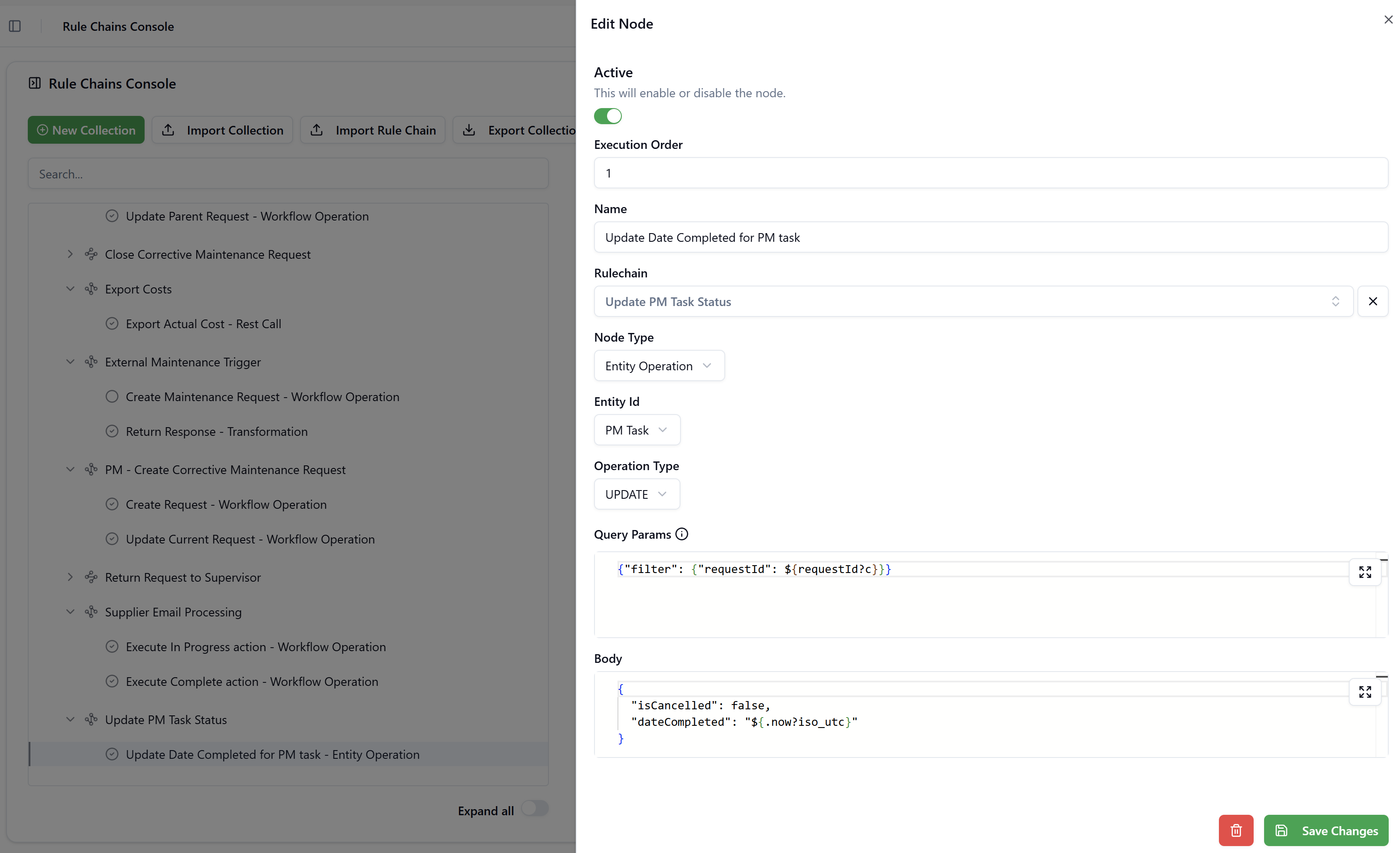
Fields
| Field | Description |
|---|---|
| Entity Id | The target SignalSync entity (e.g. PM Task, Building, Equipment). The dropdown lists all entities registered in the tenant. |
| Operation Type | The CRUD operation to perform: CREATE, READ, UPDATE, or DELETE. |
| Query Params | A JSON object (or a FreeMarker expression that evaluates to a JSON object) that defines filter and pagination parameters. Required for READ, UPDATE, and DELETE to target specific records. FreeMarker expressions are evaluated before the query is sent. |
| Body | A JSON object defining the field values to write. Required for CREATE and UPDATE. FreeMarker expressions can be used to reference the current data model. |
Operation Types
CREATE — inserts a new record into the target entity table. The Body defines the fields and values of the new record.
READ — retrieves records matching the filter defined in Query Params. The result is available to subsequent nodes via the nodeN variable (where N is the execution order number of this node).
UPDATE — modifies records matching the filter in Query Params. Only the fields specified in the Body are changed; other fields are left unchanged.
DELETE — permanently removes records matching the filter in Query Params.
Query Params
The Query Params field accepts a JSON object. The primary key is filter, which maps field names to match values. FreeMarker expressions are evaluated within the JSON string:
{
  "filter": {
    "requestId": ${requestId?c}
  }
}
Use ?c (computer format) for numeric values in filters and URLs to avoid locale-based thousands separators. Without ?c, FreeMarker may render 221366 as 221,366, which would break the filter.
Hovering over the ⓘ icon next to Query Params shows a tooltip: "In this field you can configure the URL parameters of the request to be sent. Please ensure that your JSON input follows the correct format with keys and values properly enclosed in double quotes, and with commas separating each key-value pair."
Example — UPDATE: Set date completed on a PM Task
This node from the Update PM Task Status Rule Chain updates the dateCompleted field on a PM Task record, filtering by requestId received in the payload:
Query Params:
{
  "filter": {
    "requestId": ${requestId?c}
  }
}

Body:
{
  "isCancelled": false,
  "dateCompleted": ${.now?iso_utc?c}
}
.now is a built-in function of FreeMarker that returns the current date and time, ?iso_utc transforms the current date-time to UTC timestamp in ISO 8601 format, e.g. 2026-03-18T10:30:00Z, and ?c wraps it in double quotes to make it a valid JSON string.
Node Type: Workflow Operation
Triggers an action on a GWE workflow — creating a new request, performing a workflow action (transition), or simply updating request details. This is the primary node type for automating actions within SignalSync processes.
Click to view a Workflow Operation node example
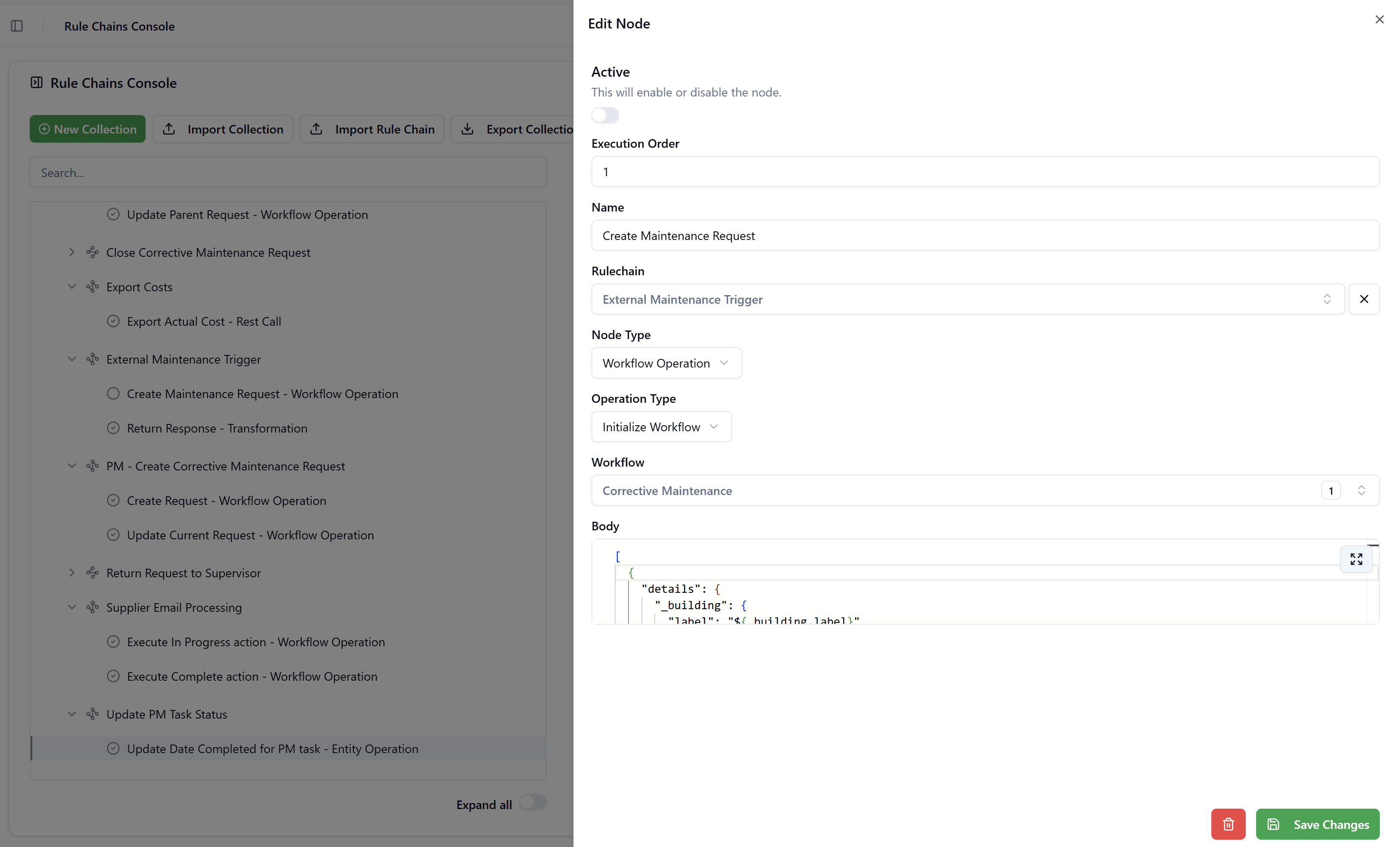
Fields
| Field | Description |
|---|---|
| Operation Type | The type of workflow action: Initialize Workflow, Perform Action, or Update Request Details. |
| Body | A JSON payload defining the operation parameters. Structure varies by Operation Type (see below). FreeMarker expressions are fully supported. |
Operation Type: Initialize Workflow
Creates one or more new GWE workflow request(s). The Body must be wrapped in an outer array [{...}] and must include the details object with the field values for each new request. The wfId is automatically populated with the UUID of the workflow selected in the Rule Chain configuration.
[
  {
    "details": {
      "_building": {
        "label": "${details['_corrective_building'].label}",
        "value": "${details['_corrective_building'].value}"
      },
      "_priority": "${details['_corrective_priority']!''}",
      "_description": "${details['_corrective_description'] + '\n\nCreated from PM request: #' + requestId?c}"
    }
  }
]
The response of this node is accessible in subsequent nodes as nodeN[0]['wfRequestResponse']['requestId'], where N is this node's execution order number. This allows a downstream Transformation or Workflow Operation node to reference the newly created request ID.
Operation Type: Perform Action
Executes a specific GWE workflow action (transition) on one or more existing request(s). This is equivalent to a user clicking an action button on the request form. The body must be an array and must include requestId, actionName, and optionally comments and details.
[
  {
    "requestId": ${requestId?c},
    "actionName": "Close",
    "comments": "Request automatically closed",
    "details": {
      "_description": "${details['_description'] + '\n\nRequest Closed'}"
    }
  }
]
Common actionName values depend on the workflow configuration — typical examples include Close, Return, In Progress, and Complete.
Operation Type: Update Request Details
Updates fields on an existing request without triggering a workflow action transition. Use this when you need to silently modify data (e.g. append text to a description field) after another node has created a linked request.
The Body is a plain JSON object (not an array) with requestId and a details map:
{
  "requestId": ${requestId?c},
  "details": {
    "_description": "${details['_description'] + '\n\nNew request created: #' + node1[0]['wfRequestResponse']['requestId']?c}"
  }
}
When a Rule Chain creates a new request (Initialize) and then needs to update the original request with the new ID, use Update Request Details as the second node, referencing the first node's output via node1[0]['wfRequestResponse']['requestId']?c.
Node Type: REST Call
Sends an HTTP request to an external REST API endpoint. The response is made available to subsequent nodes. Use this node for pushing data to external systems (ERP, accounting, IoT platforms) or pulling data from third-party APIs.
Click to view a REST Call node example
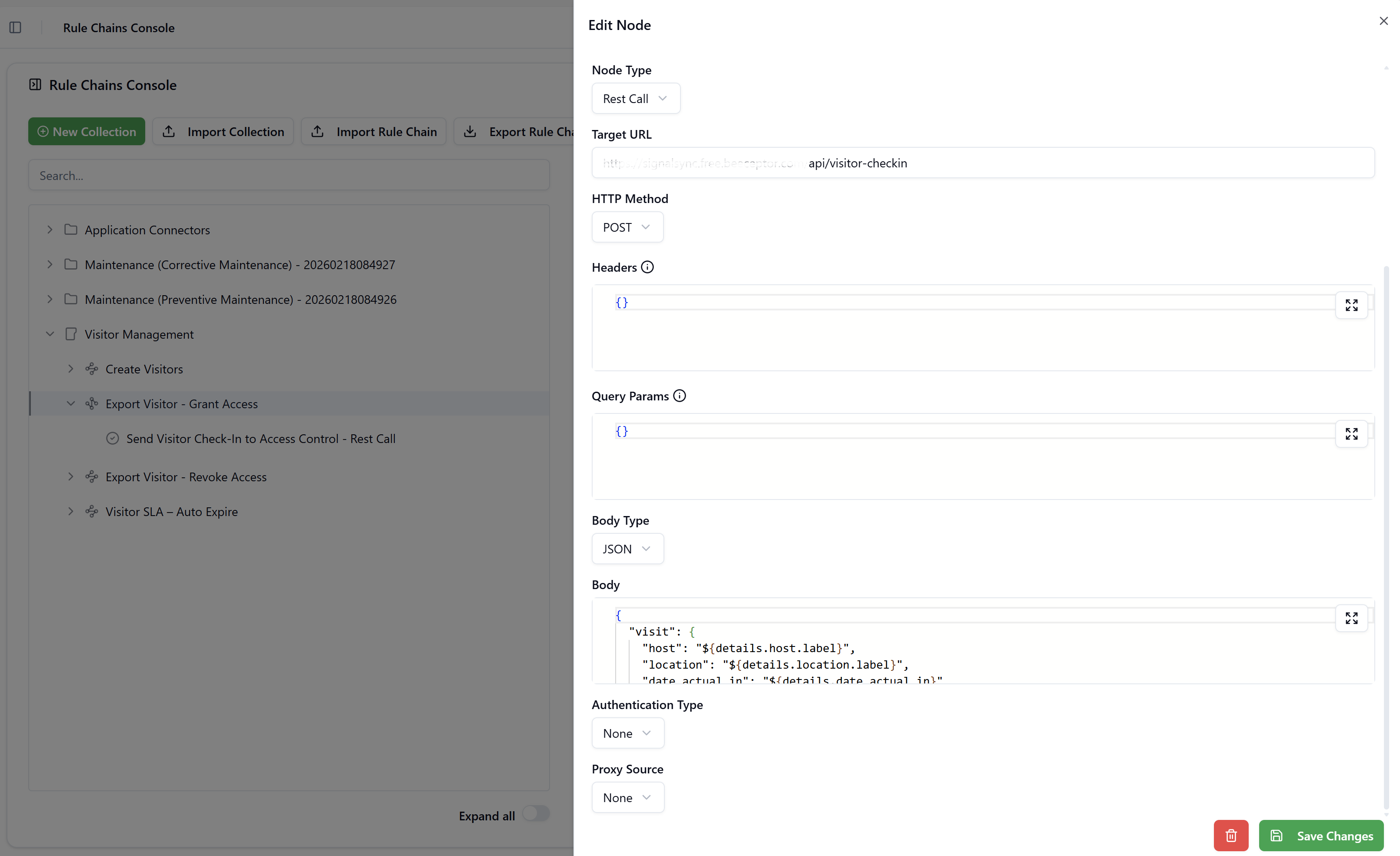
Fields
| Field | Description |
|---|---|
| Target URL | The full URL of the external endpoint. FreeMarker expressions can be used to inject dynamic values, e.g. https://api.example.com/worklog/updated?since=${node1.mondayTimestampMs?c} |
| HTTP Method | The HTTP verb: GET, PUT, POST, DELETE, PATCH, HEAD, or OPTIONS. |
| Headers | A JSON object of HTTP headers to include in the request, e.g. {"Content-Type": "application/json", "x-api-key": "abc123"}. FreeMarker expressions are supported. |
| Query Params | A JSON object of query string parameters appended to the URL. FreeMarker expressions are supported. |
| Body Type | The content type of the request body: None, Text, JSON, XML, HTML, Binary, Form Data, or X WWW Form URL Encoded. |
| Body | The request body content. FreeMarker expressions are evaluated before the request is sent. |
| Authentication Type | The authentication method for this node: None, Inherit, Basic, Token Bearer, OAuth2, or Certificate. Selecting Inherit uses the Shared Authentication defined on the Rule Chain. |
| Proxy Source | Optional proxy configuration: None, Direct, or PAC File. Useful for on-prem deployments behind proxies. |
Example — POST: Export actual cost to an external system
This node from the Export Costs Rule Chain posts cost data to an external endpoint:
Target URL: https://[API_DOMAIN]/api/costs
HTTP Method: POST
Body Type: JSON

Body:
{
  "requestId": ${requestId?c},
  "cost_actual": ${_total_actual_cost!0}
}
The ! operator after _total_actual_cost provides a default value if the field is null, preventing a FreeMarker error if the value is missing.
Example — GET: Fetch Jira work logs
This node calls the Jira REST API, injecting the Monday timestamp computed by the previous node:
Target URL: https://[JIRA_DOMAIN]/api/3/worklog/updated?since=${node1.mondayTimestampMs?c}
HTTP Method: GET
Authentication Type: Inherit
Node Type: Transformation
Applies FreeMarker template logic to reshape, validate, or enrich data. The node body is a FreeMarker template that can reference any field from the current data model or from the output of previous nodes. The rendered output becomes the new data context for subsequent nodes.
Example — Filtering users by age
Let's assume we received a list of users from a REST Call node and it looks like this:
[
  {
    "id": 1,
    "name": "John",
    "age": 30
  },
  {
    "id": 2,
    "name": "Mary",
    "age": 12
  },
  {
    "id": 3,
    "name": "Michael",
    "age": 23
  }
]
We want to filter people under 18 and then we want to keep only their names.
We can achieve this with a Transformation node like this:
<#-- We assume in this example the rest call node that returned the user list has execution order = 1 -->
${json(node1?filter(user -> user.age gte 18)?map(user -> user.name))}
This will print the following:
[ "John", "Michael" ]
Assuming this Transformation node has an execution order of 2, the following nodes can refer to this list as ${node2} and they will now receive a curated list of the names of all users that are 18 and over.
The json function you see in this example is not part of the native FreeMarker syntax.
It's a customly built function that helps us print various objects (lists, maps, dates, non-textual primitive types like numbers and booleans) as valid JSON strings.
Fields
| Field | Description |
|---|---|
| Body | A FreeMarker template. The template is evaluated against the current execution context and its rendered output is used as the result of the node. |
FreeMarker Expression Reference
FreeMarker is the expression language used across all node types in Rule Chains.
The sections below cover the patterns most commonly used in SignalSync integrations.
Accessing Input Data
The execution context makes the input payload fields available as top-level variables. For a workflow request, standard fields include requestId, details, wfId, and any custom detail fields.
${requestId}                          → the current request ID (integer) in human readable format (with thousands separators)
${requestId?c}                        → request ID without thousands separators (use in URLs and JSONs)
${details['_description']}            → access a field from the request details by name
${details._priority}                  → dot notation for simple field names (equivalent to the method above)
${(details._equipment.label)!}        → safe access with empty-string default for nested optional fields
Accessing Previous Node Output
Each node's output is available via the nodeN variable, where N is the execution order number.
For Workflow Operation nodes that return a response array, access the first element with [0]:
${node1.mondayTimestampMs?c}                          → mondayTimestampMs is a numeric field from node 1's output
${node1[0]['wfRequestResponse']['requestId']}         → new request ID created by node 1
${node2[0]['wfRequestResponse']['requestId']?c}       → computer format (without thousands separators)
Date and Time
${.now?iso_utc}                              → current UTC timestamp: 2026-03-18T10:30:00Z
${.now?string("yyyy-MM-dd")}                 → formatted date: 2026-03-18
${"2026-03-18"?date("yyyy-MM-dd")?long}      → parse date string to epoch milliseconds
Use ?date("yyyy-MM-dd")?long when you need to compare dates numerically or pass a timestamp to an API query parameter, as in the Jira worklog integration.
String Operations
${"Hello World"?lower_case}                 → hello world
${"Hello World"?upper_case}                 → HELLO WORLD
${someValue?replace('"', '\\"')}            → escape double quotes for safe JSON embedding
${"2026-03-18T10:30:00Z"?substring(0, 10)}  → 2026-03-18  (date portion only)
Default Values and Null Safety
${(details._description)!''}    → empty string if details._description is null or missing
${(details._equipment.label)!}  → empty string (shorthand)
${someField???c}                → "true" if field exists and is not null, "false" otherwise
The double question mark ?? is the FreeMarker existence check: it returns true if the variable exists and is not null.
The ?c at the end just makes the true or false boolean output intro a string so FreeMarker can print it, otherwise it throws an error.
Conditionals
<#if details._priority == "High">
  priority is high
<#elseif details._priority == "Medium">
  priority is medium
<#else>
  priority is low
</#if>
For numeric comparisons, use gte and lte instead of >= and <= to avoid possible FreeMarker parser conflicts:
<#if someValue?number gte 100>
  value is at least 100
</#if>
Loops and Arrays
<#list entries as e>
  ${e.workDate} - ${e.hoursSpent}h
</#list>
Use <#sep> to insert a separator between items without a trailing comma — critical when building JSON arrays:
[
  <#list entries as e>
  {
    "workDate": "${e.workDate}",
    "hoursSpent": "${e.hoursSpent}"
  }<#sep>,</#sep>
  </#list>
]
Building Objects and Merging Maps
<#assign updated = details + {"_description": details['_description'] + '\n\nAppended text'}>
{ "details": ${json(updated)} }
The + operator merges two maps, with the right-hand map overriding any duplicate keys. Our custom json() function serializes the result as valid JSON.
Stopping Execution with an Error
The <#stop> directive halts the Rule Chain immediately and returns the provided message as an error. When the Rule Chain is used as a BEFORE_ACTION event in GWE, the message is displayed to the user as a validation error.
<#if !details.supplier??>
  <#stop "[ValidationError] Supplier is required">
</#if>
<#stop> can also reference a Shared Attribute key defined on the Rule Chain, keeping error messages in a central location:
<#if !details??><#stop MSG_ERROR_DETAILS_MISSING></#if>
Using Shared Attributes
Values defined in the Rule Chain's Shared Attributes JSON object are available directly by key name in any node body:
{
  "MSG_ERROR_ROOM_MISSING": "[ValidationError] Room cannot be empty",
  "EXPORT_ENDPOINT": "https://api.example.com/costs"
}
Reference them using ${} interpolation:
<#if !details._room??><#stop MSG_ERROR_ROOM_MISSING></#if>
Example — Transformation: Validate date range across multiple rows
This pattern iterates over a list of work entries and stops execution if any end date is before the corresponding start date:
<#list _work as w>
  <#assign workDateStart = (w._work_date_start)!"">
  <#assign workDateEnd = (w._work_date_end)!"">
  <#assign rowIndex = w?index + 1>

  <#if workDateEnd?datetime.iso?long < workDateStart?datetime.iso?long>
    <#stop "[ValidationError] Row ${rowIndex}: Work end date must be after work start date">
  </#if>
</#list>
{ "valid": true }
?datetime.iso?long parses an ISO 8601 string and converts it to epoch milliseconds, enabling reliable numeric comparison.
Example — Transformation: Shape response for external caller
This pattern from the External Maintenance Trigger Rule Chain returns a structured JSON response to the calling system:
{
  "message": "Successfully processed"
}
For more complex responses, reference the newly created request ID from the previous Workflow Operation node:
{
  "message": "Request created successfully",
  "requestId": ${node1[0]['wfRequestResponse']['requestId']?c}
}
Example — Transformation: Filter and reshape API response
This pattern from the Jira Timesheets Rule Chain builds a deduplicated lookup map and filters worklogs by date range before producing a clean JSON output:
<#assign mondayMs = node1.mondayDate?date("yyyy-MM-dd")?long>
<#assign fridayMs = node1.fridayDate?date("yyyy-MM-dd")?long>

<#-- Build a lookup map: issueId → summary -->
<#assign issueMap = {}>
<#list node3 as issue>
  <#assign issueMap = issueMap + {issue.id: issue.fields.summary}>
</#list>

<#-- Filter and accumulate entries, avoiding trailing commas with <#sep> -->
<#assign entries = []>
<#list node2.worklogs as wl>
  <#assign wlMs = wl.started?date("yyyy-MM-dd")?long>
  <#if (wlMs gte mondayMs) && (wlMs lte fridayMs)>
    <#assign entries = entries + [{
      "workDate": wl.started?substring(0, 10),
      "hoursSpent": (wl.timeSpentSeconds / 3600)?string("0.##"),
      "author": wl.author.displayName,
      "issueTitle": issueMap[wl.issueId]!"(unknown issue)"
    }]>
  </#if>
</#list>

{
  "count": ${entries?size},
  "entries": [
    <#list entries as e>
    {
      "workDate": "${e.workDate}",
      "hoursSpent": "${e.hoursSpent}",
      "author": "${e.author}",
      "issueTitle": "${e.issueTitle?replace('"', '\\"')}"
    }<#sep>,</#sep>
    </#list>
  ]
}
Key techniques used here: gte/lte for numeric comparisons, <#sep> to avoid trailing commas in JSON arrays, ?replace('"', '\\"') to safely escape quotes in string values, and building arrays incrementally with entries = entries + [...].
Node Type: Continue Condition
Evaluates a FreeMarker expression that must resolve to a truthy or falsy value.
If the expression evaluates to any of true, 1, on or yes, execution continues to the next node.
If it evaluates to any of false, 0, off, no, the Rule Chain stops immediately without an error.
Fields
| Field | Description |
|---|---|
| Expression | A FreeMarker expression that evaluates to a boolean-like value. The ⓘ tooltip confirms: "If the expression evaluates to true, the execution will continue with the next nodes. If the expression evaluates to false, the execution will stop immediately." |
Supported Truthy Values
true, 1, on, yes
Supported Falsy Values
false, 0, off, no
Examples
Stop if supplier is not set:
${(details.supplier)???c}
Continue only on Monday (used in scheduled Rule Chains):
${(.now?string("EEEE") == "Monday")?c}
Continue only if the user is a Tenant Administrator:
${(user.role == "TENANT_ADMIN")?c}
Continue only if a related list has entries:
${(_work?? && _work?size > 0)?c}
Place a Continue Condition node early in a Rule Chain to guard against missing required data. This prevents downstream REST Call or Workflow Operation nodes from executing with an incomplete payload and producing hard-to-diagnose errors.